


Construction scheduling software in the US market ranges from basic task boards for small residential contractors to full CPM platforms for capital infrastructure projects.
This guide covers ten best construction scheduling software options organized by firm type and project scale, with verified G2 and Capterra ratings, current pricing, and a clear note on which tools support true critical path scheduling and which do not. Read the category that matches your firm first, then compare tools within it.
What Does Construction Scheduling Software Do?
Construction scheduling software builds a structured execution plan for a project and tracks actual progress against it. The five core functions below determine how much operational value a platform delivers.
Critical Path Method (CPM) Scheduling
CPM scheduling identifies the longest sequence of dependent tasks in a project and calculates the minimum possible project duration from that sequence.
A delay to any task on this path extends the project finish date by the same number of days.
Procore, Autodesk Build, and InEight include a native CPM engine. Plaky, Smartsheet, and Jobber handle task sequencing but do not calculate the critical path.
Resource Allocation and Conflict Detection
Resource allocation tools centralize availability data for labor, equipment, and subcontractors across all active projects.
When the same crew or piece of equipment is assigned to two sites on the same date, the platform surfaces the conflict before it reaches the field.
For firms running multiple projects simultaneously, this prevents coordination errors that typically only become visible when a superintendent calls to report a problem.
Real-Time Dependencies and Schedule Updates
Dependency tracking connects tasks so that a shift in one activity automatically adjusts all tasks that follow it in sequence.
A two-day delay in material delivery moves the pour date, which moves framing, which moves inspection scheduling. The cascade recalculates without manual intervention.
Platforms vary significantly in how reliably this logic holds under real project conditions.
Field-to-Office Synchronization
Field-to-office sync pushes progress updates entered on a mobile device at the jobsite directly into the master schedule.
Plan revisions made in the office reach field teams through the same channel without a separate distribution step.
When this sync breaks down through poor mobile design or offline gaps, superintendents work from outdated information and office-side schedules drift from site reality.
Reporting and Forecasting
Reporting tools convert raw schedule data into outputs for different decision-makers.
Schedule performance index figures, earned value reports, and two-to-four-week look-ahead schedules serve different audiences and decision types.
InEight and Procore generate these as standard outputs. Smartsheet requires configuration to produce equivalent reports, and Plaky produces no construction-specific reporting natively.
Overview of the Best Scheduling Software for Construction in the US
| Tool | Category | Rating (G2/Capterra) | Market Presence | Primary Strength | Starting Price | Free Plan / Trial | Best For |
| Procore | Enterprise / Heavy Industrial | 4.6/5 | 23+ Years (~13% US Adoption) | All-in-one ecosystem linking schedules to RFIs and costs | Custom (est. $375–$1,200+/mo) | No free plan; no trial | Mid-to-large general contractors managing commercial portfolios |
| Autodesk Build | Enterprise / Heavy Industrial | 4.5/5 | 10+ Years (~29% US Adoption) | Deep BIM integration and 3D model-to-schedule connectivity | Custom (est. $500+/mo) | No free plan; trial available | Design-build firms and AEC organizations in the Autodesk suite |
| InEight | Enterprise / Heavy Industrial | 4.4/5 | 35+ Years (High Industrial Adoption) | Predictive analytics and real-time Earned Value Analysis | Custom | No free plan; no trial | Capital project owners and heavy civil contractors above $50M |
| Houzz Pro | Residential / SMB | 4.5/5 | 4+ Years (Dedicated Pro Suite) | Client visualization and communication portals | $99/month | No free plan; trial available | Residential remodelers, designers, and custom home builders |
| Buildxact | Residential / SMB | 4.6/5 | 10+ Years (Emerging SMB leader) | Seamless transition from bid/estimate to active schedule | $149/month | No free plan; 14-day trial | Small residential builders and renovation contractors |
| BuildOps | Specialty / Service | 4.8/5 | 8+ Years (Top MEP Choice) | Blending long-term project installs with urgent service dispatch | Custom (est. $200+/user/mo) | No free plan; no trial | Commercial HVAC, electrical, plumbing, and mechanical contractors |
| Jobber | Specialty / Service | 4.7/5 | 14+ Years (Field Service Leader) | High-volume dispatching, route optimization, and mobile payments | $49/month | No free plan; trial available | Residential service trades and high-volume short-duration jobs |
| Plaky | Flexible / Visual | 4.3/5 | 4+ Years (Entry-level) | Visual simplicity with Kanban and basic Gantt charts | $3.99/user/month | Free plan available | Small teams moving off paper and spreadsheets |
| Smartsheet | Flexible / Visual | 4.5/5 | 20+ Years (15%+ Market Share) | Spreadsheet-style interface with backend automation | $9/user/month | No free plan; trial available | Project managers transitioning from Excel |
| Fieldwire | Specialty / Service | 4.5/5 | 12+ Years (~4% US Adoption) | Version control for blueprints and plan-based task pinning | $39/user/month | Free plan (up to 5 users) | Field teams prioritizing drawing accuracy and mobile coordination |
Note: Adoption rates based on 2026 Ramp vendor data and market share indices. Marketplace ratings reflect G2 and Capterra averages as of 2026.
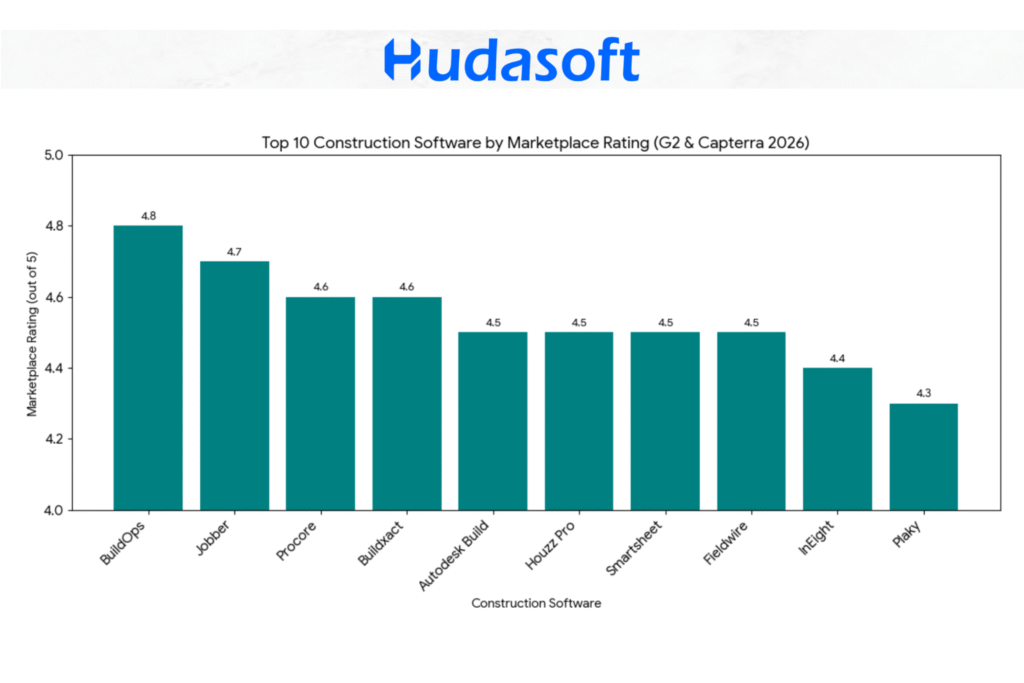
Most highly rated construction scheduling software on G2 and Capterra
This visualization shows that specialized niche tools like BuildOps (4.8) and Jobber (4.7) achieve the highest user satisfaction scores by solving specific workflow pain points for service and specialty contractors. In contrast, massive enterprise platforms and general-purpose tools maintain high but slightly lower scores due to their increased complexity or broader feature sets.
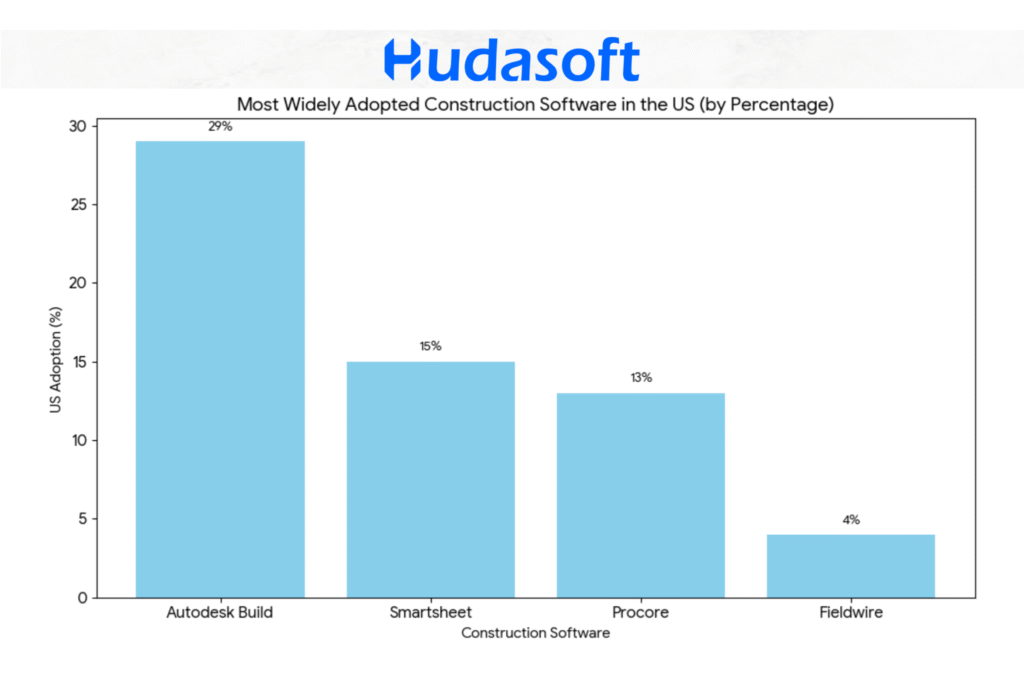
Most popular construction scheduling platforms based on adoption in the US
This chart illustrates Autodesk Build’s market dominance (~29%) within the AEC sector, followed by Smartsheet’s high cross-industry adoption (15%+) and Procore’s strong specialized presence (~13%). It highlights how ecosystem integration and flexible, spreadsheet-style logic drive widespread use.
Which Construction Scheduling Software Supports True CPM?
CPM (Critical Path Method) scheduling software calculates the longest chain of dependent tasks in a project, identifying which activities drive the completion date and which delays will push the finish date. This is a mathematical calculation, not a visual display of tasks on a timeline.
The distinction matters because many platforms present Gantt charts and task lists that look like scheduling tools but do not perform critical path calculations. Buying a non-CPM tool for a project that requires critical path control creates a gap that manual workarounds cannot reliably close.
| Tool | True CPM Engine | Notes |
| Procore | Yes | Native CPM with Gantt integration; also imports P6 and MS Project schedules |
| Autodesk Build | Yes | CPM through schedule module; strongest value when paired with BIM workflows |
| InEight | Yes | CPM with earned value analysis; built for capital and heavy civil projects |
| Buildxact | No | Task sequencing and dependencies only; no critical path calculation |
| Houzz Pro | No | Project timelines and milestones; no CPM engine |
| BuildOps | No | Dispatch and installation scheduling; no CPM depth |
| Jobber | No | Calendar and dispatch scheduling; no task dependencies or CPM |
| Smartsheet | No | Gantt views with dependencies; no critical path calculation |
| Plaky | No | Kanban and basic Gantt; no CPM |
| Fieldwire | No | Task and drawing management; no CPM scheduling |
For general contractors managing commercial or industrial projects, CPM capability is a procurement requirement, not a preference. For residential builders and small service contractors, task sequencing without a CPM engine is typically sufficient.
How to Evaluate Construction Scheduling Software?
Four criteria consistently separate platforms that get used from platforms that get abandoned: mobile accessibility, ease of adoption, feature depth matched to project scale, and security compliance.
Feature comparisons and ratings only tell part of the story. Before evaluating any specific platform, it is worth understanding the practical criteria that separate a tool that works in theory from one that actually gets used on a jobsite.
Mobile Accessibility
Construction work happens in the field, not at a desk. A scheduling platform that works well on desktop but poorly on mobile is misaligned with how teams operate. Superintendents, foremen, and subcontractors need to view schedules, update tasks, access drawings, and log reports from wherever they are, often with limited connectivity.
Mobile access matters for a simple reason: if field teams cannot use the platform easily, they will not use it. Data stops flowing, schedules drift from reality, and the tool loses value. Firms with the highest adoption rates almost always choose platforms with truly usable mobile interfaces, not ones added as an afterthought.
When evaluating, look beyond the presence of an app. Check for offline capability, photo capture and annotation, and automatic syncing once connectivity returns.
Ease of Use
Construction teams are not software professionals. A platform that takes weeks to learn or requires a dedicated administrator will face resistance, regardless of its power.
Ease of use matters because adoption is the real bottleneck. The most advanced tool is useless if teams rely on notebooks instead. A simpler platform that everyone uses daily will outperform a complex one used by only a few.
This does not mean choosing the simplest option. It means matching the platform to your team’s technical comfort while pushing it slightly forward. Firms that involve field leadership in selection, rather than deciding purely at the executive level, consistently see better adoption.
Feature-Richness
Construction management scheduling software that bundles scheduling with financials, RFIs, and submittals serves a different buyer than a standalone scheduling tool. Know which one your firm actually needs before evaluating features.
For certain firms, depth of functionality is essential. A heavy industrial contractor managing large capital projects needs earned value analysis, resource-loaded scheduling, and cost system integration, a scope that artificial intelligence implementation planning defines before any platform decision is made. A commercial contractor handling multiple projects needs subcontractor coordination, submittal tracking, and document control. For these cases, a simplified tool becomes a liability.
Feature depth matters because your platform should scale with project complexity. When a capability is missing, the workaround is always more expensive, whether in labor, errors, or delayed decisions.
The key question is not how many features exist, but whether the platform delivers the depth your firm’s project type requires. A superficial implementation is less valuable than a focused, well-executed one.
Security and Compliance
Construction projects involve sensitive data, from financials and contracts to proprietary designs and BIM models. As platforms move to the cloud, security has become a core procurement concern.
It matters for both legal and practical reasons. A breach can expose client data, create liability, and damage reputation long after a project ends. For firms in government, healthcare, or infrastructure, compliance with standards like SOC 2 Type II or FedRAMP may be mandatory. This is where AI consulting services become as important as the platform selection itself, ensuring security requirements are defined before a vendor is chosen rather than discovered after.
When evaluating platforms, ask about encryption (in transit and at rest), role-based access controls, audit trails, and the vendor’s history of incident disclosure. Vague answers are a clear warning sign.
Construction Scheduling Software by Project Type
The right platform depends on what type of construction your firm delivers. Residential builders, commercial general contractors, and heavy civil contractors have different scheduling requirements, and no single tool serves all three equally well.
Residential Construction Scheduling Software
Residential construction scheduling software needs to connect estimating, scheduling, and client communication in one workflow. The typical residential builder does not need CPM depth, but does need to move from a won bid into a live schedule without rebuilding data from scratch.
Buildxact is the strongest option for small residential builders because it links the estimating module directly to the schedule, pulling scope items and subcontractor line items forward when a bid is approved. Houzz Pro suits design-build residential firms where client visualization and home builder scheduling software capabilities matter as much as the schedule itself.
For volume home builders running ten or more concurrent starts, these platforms reach their ceiling, and a heavier platform or custom solution becomes necessary.
Commercial Construction Scheduling Software
Commercial construction scheduling software must handle multi-trade coordination, subcontractor scheduling, RFI management, and document control alongside the schedule itself. Commercial projects involve more stakeholders, longer durations, and higher stakes for schedule slippage than residential work.
Procore is the most widely adopted commercial construction scheduling software for mid-to-large general contractors because it connects schedule tasks to cost codes, RFIs, and change orders within one platform. Autodesk Build is the preferred choice for design-build commercial firms and AEC organizations already working within the Autodesk ecosystem.
General contractor scheduling software at the commercial level needs to serve both office and field teams simultaneously, with mobile access that holds up on active job sites.
Enterprise and Heavy Civil Construction Scheduling Software
Enterprise and heavy civil construction scheduling software operates at a different level of analytical depth. Capital project owners and heavy civil contractor scheduling software users need earned value analysis, quantity-based productivity tracking, and schedule performance reporting that satisfies both internal controls and owner requirements.
InEight is purpose-built for this segment, covering oil and gas infrastructure, power generation, large civil works, and industrial manufacturing projects above $50M. Procore serves as the enterprise platform for firms that need the same level of lifecycle management but operate across commercial and infrastructure sectors simultaneously.
Both require dedicated project controls expertise to operate at full capability.
The Top 10 Construction Scheduling Tools in the USA
Our selection draws from four sources: verified user reviews on G2 and Capterra (2026 data), official product documentation and feature comparisons, US market adoption figures from Ramp vendor spending data and AGC industry research, and publicly disclosed pricing.
Each tool was assessed against five criteria: scheduling depth and CPM capability, ease of adoption for construction teams, integration fit with common construction workflows, pricing relative to the firm size it serves, and verified user satisfaction scores.
Tools are organized by firm type rather than ranked one-to-ten, because no single platform is the best construction scheduling software for every use case.
Category 1: Scheduling Software for Enterprise and Heavy Industrial Construction Companies
Procore
Marketplace Rating: 4.6/5
23+ Years in Market
~13% US Construction Adoption
Pricing: Custom pricing based on annual construction volume. Estimated $375 to $1,200+ per month for mid-size firms.
Procore is the dominant integrated construction management platform for mid-to-large general contractors. Its scheduling functionality is just one aspect of a broader ecosystem that also handles project financials, document management, quality control, safety logs, and owner reporting.
This matters because, in Procore, a schedule delay does not exist in isolation: it can be linked to an RFI, a cost code, and a change order request, all in the same platform.
The scheduling module supports Gantt chart views and integrates directly with Primavera P6 and Microsoft Project for firms that build their master schedules in those tools. Procore itself does not replace P6 for heavy industrial scheduling, but it serves as the central source of truth where field teams, subcontractors, and owners all access current schedule information without needing a P6 license.
Procore’s strongest suit is lifecycle management. From preconstruction through closeout, every document, inspection, budget entry, and schedule revision lives in one place.
For firms managing multiple simultaneous projects across different geographies, centralization has significant operational value.
Where Procore can feel heavy is for smaller firms. The platform is feature-rich, which means implementation takes time, training requires investment, and the monthly cost is substantial.
Firms doing fewer than 10 projects per year or working in residential at smaller volumes often find that they are paying for capabilities they do not use.
Best for: Mid-to-large general contractors, commercial builders, and multi-trade firms managing complex project portfolios.
Autodesk Build
Marketplace Rating: 4.5/5
10+ Years (evolved from PlanGrid and BIM 360)
~29% US AEC Adoption
Pricing: Part of Autodesk Construction Cloud. Pricing by custom quote. Estimated $500+ per month for teams. Trial available.
Autodesk Build carries the highest overall adoption rate among the tools in this guide, largely because it is part of the Autodesk Construction Cloud ecosystem that architecture, engineering, and construction firms have used for decades. Its roots trace back to PlanGrid (acquired in 2018) and BIM 360 (now integrated), which means it has deep institutional penetration in firms that already work inside Autodesk’s design environment.
The critical differentiator in Autodesk Build is BIM integration. BIM is a process of creating and managing digital representations of a building’s physical and functional characteristics, and when a 3D model changes, that change propagates through to connected construction documents.
In Autodesk Build, model changes can be linked directly to affected schedule tasks. For design-build firms or those working on complex commercial and institutional projects where design and construction overlap, this integration delivers operational value rather than functioning as a marketing claim.
Autodesk Build also handles document management, RFIs, submittals, and field reporting. Its scheduling module supports both Gantt and calendar views, with look-ahead scheduling features that help superintendents plan two-to-four-week windows in detail without losing sight of the master schedule.
One practical consideration: getting the most out of Autodesk Build typically requires that your project team, including designers and engineers, also work within the Autodesk ecosystem.
If your design partners use different tools, some of the integration value is lost.
Best for: Commercial general contractors, design-build firms, and AEC organizations already invested in Autodesk’s suite.
InEight
Marketplace Rating: 4.4/5
35+ Years in Market
High Adoption in Heavy Industrial and Capital Projects
Pricing: Enterprise pricing by custom quote. Contact InEight sales directly.
InEight is not a household name in the residential or light commercial world, and it does not try to be. It is built for high-stakes capital projects: oil and gas infrastructure, power generation facilities, large-scale civil works, and industrial manufacturing plants.
These are environments where a one-day schedule slippage on a critical path item can cost hundreds of thousands of dollars and where schedule performance is scrutinized at the executive and board level.
The platform’s core strength is predictive analytics and schedule controls. InEight integrates the schedule with cost, so project controls teams can run earned value analysis in real time, comparing the budgeted cost of work scheduled (BCWS) against the earned value (BCWP) and actual cost (ACWP).
These are not academic metrics in industrial construction. They are the early warning signals that tell a project director whether they are heading for an overrun before it is too late to intervene.
InEight also supports quantity-based productivity tracking, which is particularly valuable in civil and industrial work where you are measuring cubic yards of excavation per hour or linear feet of pipe installed per day rather than simply marking tasks complete or incomplete.
The platform requires dedicated project controls expertise to use effectively. It is not designed for self-service. For the type of work it targets, however, that depth is a feature, not a drawback.
Best for: Capital project owners, heavy civil contractors, energy and industrial firms managing projects above $50M.
Category 2: Scheduling Software for Small Builders
Houzz Pro
Marketplace Rating: 4.5/5
4+ Years (dedicated Pro suite)
Dominant in Residential and SME Remodeling
Pricing: Starter: $99/month. Essential: $149/month. Pro+: $199/month. Free trial available.
Houzz Pro is unusual in this list because it started as a consumer-facing home design platform before building a contractor-facing suite. That origin shapes its strongest feature: client communication and visualization tools that allow remodelers and custom home builders to create 3D floor plans and room visualizations.
These visualizations help prospective clients see the finished product before signing a contract. In a market where homeowner hesitation is one of the biggest barriers to closing a sale, that capability has direct business value for residential contractors.
On the scheduling side, Houzz Pro offers project timelines with task management and client-facing milestone tracking. Clients get a portal where they can see project status, approve selections, communicate with the team, and make payments.
This transparency reduces the volume of status inquiry calls that consume a remodeler’s afternoons.
The platform also includes estimate building, invoicing, and a lead management CRM, which means a small residential firm can run a substantial portion of its business inside a single tool without paying enterprise software prices.
The scheduling functionality is less robust than what you would find in a platform like Procore. There is no CPM scheduling engine, no resource conflict detection, and limited integration with external project management tools.
For a remodeler running three to five jobs at a time, that is fine. For a production builder managing 50 simultaneous starts, it would be a constraint.
Best for: Residential remodelers, custom home builders, interior designers, and renovation contractors with a strong client-relationship component.
Buildxact
Marketplace Rating: 4.6/5
10+ Years
Emerging Adoption Among Small-to-Mid Residential Builders
Pricing: Plans from $149/month. 14-day free trial available.
Buildxact addresses one of the most painful transitions in residential construction: the gap between winning a bid and actually running the job. Many small builders are skilled at estimating and closing work but struggle to convert a bid into a structured, actionable schedule without spending hours rebuilding information from scratch.
Buildxact is designed around this workflow. The estimating module and the scheduling module share the same data, so when a bid is won, the scope items, quantities, and subcontractor line items can be pulled forward into a project schedule without re-entry.
The platform includes construction-specific cost libraries and supplier pricing integrations for Australian and US markets, which accelerate takeoff and reduce the risk of pricing errors.
The scheduling interface is straightforward, with Gantt views and task dependencies that are accessible to users who do not have formal project management training. That is intentional.
Buildxact targets builders whose primary expertise is construction, not software.
The platform is more limited at the enterprise end. Multi-project portfolio views, advanced resource management, and deep integration with accounting platforms like Sage or Viewpoint are not Buildxact’s strengths.
It fits firms doing under 50 units per year considerably better than larger production builders.
Best for: Small builders looking for residential construction scheduling software that connects estimating and job management in a single workflow, without rebuilding data from scratch after a bid is won.
Category 3: Scheduling Software for Specialty and Service Contractors
BuildOps
Marketplace Rating: 4.8/5
8+ Years
High Adoption Among Commercial Service Contractors
Pricing: Custom pricing based on team size and feature package. Typically $200+ per user per month for commercial packages.
Scheduling software for contractors in the specialty and service segment works differently from enterprise platforms. The priority is dispatch speed, field accountability, and job turnover. BuildOps was built specifically for commercial specialty contractors covering HVAC, electrical, plumbing, and mechanical firms.
What makes this segment operationally distinct is the dual scheduling challenge. These firms simultaneously manage long-running installation projects such as a new commercial HVAC system and urgent service calls such as a failed rooftop unit that needs same-day attention, from the same platform.
Most scheduling platforms handle one or the other well. BuildOps handles both. The dispatching module manages reactive service work, with drag-and-drop scheduling boards, technician skill matching, and real-time GPS tracking.
The project scheduling module handles planned installation work with task dependencies and crew assignments. When an emergency service call pulls a technician off a scheduled installation task, the platform flags the impact so a supervisor can make an informed resource decision.
BuildOps also includes service agreement management, which is valuable for MEP firms with preventive maintenance contracts. Recurring service visits can be scheduled automatically based on contract terms, freeing dispatchers from manually creating appointments each cycle.
The platform’s ratings are the highest in this guide (4.8/5), reflecting its fit-for-purpose design.
Firms outside the commercial service and MEP sector will find that the tool’s structure does not match their workflows as well.
Best for: Commercial HVAC, electrical, plumbing, and mechanical contractors managing both service and installation work.
Jobber
Marketplace Rating: 4.7/5
14+ Years
Mainly Adopted in Field Service
Pricing: Core: $49/month. Connect: $129/month. Grow: $249/month. Free trial available.
Jobber is the field service management leader for small-to-medium specialty contractors. Its user base spans landscaping, pest control, cleaning services, HVAC residential service, and other trades where the primary scheduling challenge is managing a high volume of short-duration jobs across a dispersed field crew.
The platform’s scheduling core is built around dispatching efficiency. A drag-and-drop calendar lets office staff assign and reassign jobs, with route optimization that minimizes drive time between appointments.
Field technicians receive job details, client notes, and directions through a mobile app, and they can update job status, collect payment, and request signatures from the field without calling the office.
Jobber’s accountability features are notably strong. GPS tracking confirms when technicians arrive and depart from job sites. Automated client notifications reduce no-shows and improve customer satisfaction scores.
For firms competing on service reliability in a fragmented market, these touchpoints matter.
Where Jobber reaches its limits is on complex, multi-phase projects. There is no CPM scheduling, no detailed project-level Gantt, and no sophisticated resource conflict management.
It is a field service tool, not a project management platform, and it excels within that scope.
Best for: Residential service contractors, trades firms managing high-volume short-duration jobs, and small specialty contractors prioritizing dispatch efficiency and client communication.
Category 4: Accessible Scheduling Tools That Work in Construction
Plaky
Marketplace Rating: 4.3/5
4+ Years
Rising Adoption at Entry Level and Among Visual Thinkers
Pricing: Free plan available (unlimited users, boards, tasks). Paid plans from $3.99/user/month (Pro). Business plan at $8.99/user/month.
Plaky is a project management tool that construction teams have adopted because of its visual simplicity. It is not purpose-built for construction, but its Kanban and Gantt views are intuitive enough that crews and small project teams can get up and running without formal training or a lengthy onboarding process.
For firms making their first move away from paper and spreadsheets, Plaky lowers the barrier to entry considerably. Task cards can be assigned, color-coded, given due dates, and moved between status columns.
Gantt chart views show task sequences and dependencies. Team members can comment on tasks and upload files directly within the platform.
What Plaky does not offer is construction-specific functionality: no RFI management, no submittal tracking, no resource conflict detection, no integration with estimating tools, and no CPM scheduling engine.
It is a general-purpose visual task manager that construction teams use rather than a construction management system.
That distinction matters. For a small subcontractor, a 10-person framing crew, or a firm managing a single renovation project, Plaky may be entirely sufficient.
For anyone managing multi-phase commercial work or coordinating across multiple subcontractors, the limitations will become apparent quickly.
Best for: Small teams making their first move to digital scheduling, subcontractors, and firms that prioritize simplicity over depth.
Smartsheet
Marketplace Rating: 4.5/5
20+ Years
15%+ Cross-Industry Adoption Including Construction
Pricing: Pro: $9/user/month. Business: $19/user/month. Enterprise: custom pricing.
Smartsheet occupies a specific and valuable niche: it is the platform for construction teams that are sophisticated enough to need dynamic scheduling but not ready to abandon the spreadsheet mental model that their project managers have used for years.
On the surface, Smartsheet looks like a spreadsheet, with rows, columns, familiar cell structure, and formula logic that experienced Excel users will recognize. Beneath that interface, it functions as a project management platform where Gantt chart dates update automatically when predecessors change.
Rows can be linked across sheets so a master schedule pulls live data from individual subcontractor sheets. Automation rules send notifications, update status fields, and trigger approval workflows without manual intervention.
This hybrid nature is both Smartsheet’s strength and its ceiling. Teams that are deeply Excel-native adopt it faster than purpose-built construction tools because the learning curve is shorter.
It lacks the construction-specific data model that platforms like Procore or InEight offer. There is no built-in understanding of submittal logs, RFI workflows, or earned value accounting, and teams that need those functions build workarounds that become difficult to maintain at scale.
Smartsheet is also widely used for executive-level dashboard reporting, where its ability to aggregate data from multiple project sheets into a single portfolio view is genuinely powerful without requiring a dedicated BI tool.
Best for: Project managers transitioning from Excel, firms that need flexible scheduling with automation, and organizations managing cross-functional projects where construction is one component.
Fieldwire
Marketplace Rating: 4.5/5
12+ Years
~4% US Construction Adoption (Rank #6 in Sector)
Pricing: Free plan for up to 5 users. Basic: $39/user/month. Pro: $59/user/month. Business: $79/user/month.
Fieldwire is built around a problem that causes real damage on construction sites: ensuring that the person doing the work is looking at the correct, current version of the drawings.
In construction, drawings go through multiple revisions. Sheet A-201 Rev 3 supersedes Rev 2, which superseded Rev 1. When a subcontractor builds from Rev 1 because that is what is saved on their phone from three weeks ago, you get rework.
Fieldwire’s version control system ensures that every user accessing a drawing set always sees the current revision and that previous versions are archived but clearly marked as superseded.
Beyond document management, Fieldwire includes task management tied directly to plan locations. A punch list item or an RFI can be pinned to a specific location on a drawing, which makes field coordination more precise.
The platform supports daily reports, inspection checklists, and BIM model viewing on mobile devices.
The scheduling capability in Fieldwire is more basic than what dedicated scheduling platforms offer. It supports task lists and workflows but does not include robust CPM scheduling or resource management.
Many teams use Fieldwire alongside a scheduling platform rather than instead of one: Fieldwire handles drawings and field tasks while a tool like Procore or Autodesk Build manages the master schedule.
Best for: General contractors and subcontractors for whom drawing accuracy and version control are the primary pain points, and field teams that need a strong mobile-first platform.
Why Half of All Software Purchases Fail
The statistics on construction software adoption are not optimistic.
Firms buy platforms, complete the initial setup, and then quietly revert to their old workflows within 60 to 90 days. The software continues to bill. The whiteboard comes back out. This pattern is so common it has a name in the industry: shelfware.
This primarily happens due to the steep learning curve and complex workflows of off-the-shelf scheduling platforms, a structural limitation, not a training problem. So, in addition to evaluating the features, you must also assess the software’s ease of use and learning curve.
When Off-the-Shelf Construction Scheduling Software Is Not Enough
All ten platforms covered in this guide are proven in the US market. For many firms, one of them will be the right choice. However, three workflow scenarios exist where none of the options above fully resolves the operational problem.
The first is multi-system integration. Some firms run a proprietary ERP or legacy cost accounting system that the ten tools above do not integrate with natively. Workarounds are possible but create manual data transfer points that generate errors and delay reporting.
The second is mixed vertical operations. A firm delivering residential builds and commercial fit-outs simultaneously operates two scheduling models that most SaaS tools handle separately. Managing both in one platform typically requires workarounds in either the residential or commercial module, reducing the tool’s effectiveness in at least one context.
The third is white-labeled scheduling delivery. Organizations that need to deliver scheduling capability to their own clients, with custom branding, interface, and data structure, cannot do that through any of the off-the-shelf options above. The interface belongs to the vendor, not to the firm using it.
For these cases, working with AI development services that specialize in construction workflows produces a platform shaped around your operational structure rather than a generic SaaS template. Understanding the application development process helps clarify what that scope involves before committing.
A Recap: When to Choose Which Scheduling Software
If your primary challenge is scale and lifecycle management across multiple complex projects, Procore and Autodesk Build are the category leaders. The implementation investment is real, but the return in operational visibility is proportionate.
If you operate in heavy industrial or capital project environments where schedule and cost controls are a professional discipline, InEight is built for your world in a way that generalist platforms are not.
If you are a residential or small commercial builder trying to professionalize your operations without enterprise complexity, Buildxact and Houzz Pro address the specific workflows that cause friction at your scale.
If your firm is a specialty or service contractor in the MEP space, BuildOps is the most purpose-fit option available. If your work is higher-volume, shorter-duration field service, Jobber’s dispatch and accountability features are best in class.
If your team is not ready for a full platform transition, Smartsheet and Plaky offer genuine value as stepping stones. They will not give you CPM scheduling or resource conflict detection, but they will get your team off paper and onto a shared digital record, which is the first step.
Frequently Asked Questions
Q: What is the best free construction scheduling software?
The best free construction scheduling software options for small teams are Plaky and Fieldwire. Plaky’s free tier includes unlimited users, boards, and tasks with basic Gantt functionality.
Fieldwire’s free plan supports up to five users with plan viewing and task management. For teams running more than three to five active projects simultaneously, free-tier limitations become a bottleneck, and paid plans are typically necessary.
Q: What construction scheduling software do general contractors use most?
General contractors in the US use Procore and Autodesk Build most widely. Procore is the most common choice across mid-to-large commercial general contractors.
Autodesk Build is preferred by firms already working within the Autodesk AEC ecosystem, particularly those running BIM-driven workflows.
Q: Is CPM scheduling software different from general construction scheduling software?
CPM scheduling software is different from general construction scheduling software in one fundamental way: it calculates the longest sequence of dependent tasks to identify which delays will push the project end date.
General scheduling tools manage tasks and timelines without performing this calculation. Of the tools covered in this guide, Procore, Autodesk Build, and InEight support CPM scheduling. Jobber, Plaky, and Smartsheet do not.
Q: What is the best construction scheduling software for small contractors?
The best construction scheduling software for small contractors depends on the type of work involved. Jobber is the stronger option for service-based trades managing multiple daily jobs with field teams.
Buildxact suits small residential builders who need to move from estimate to schedule without re-entering data. Both are accessible on pricing and require minimal onboarding relative to enterprise platforms.
Q: What is the best construction scheduling software for residential builders?
The best construction scheduling software for residential builders is Buildxact or Houzz Pro, depending on the workflow. Buildxact is stronger on scheduling depth and the estimating-to-schedule transition.
Houzz Pro is better suited to design-build firms where client presentation and lead management are central to the process. For volume home builders running ten to thirty concurrent builds, Procore or a custom-built scheduling solution may be more appropriate.
Q: How much does construction scheduling software typically cost?
Construction scheduling software typically costs between $3.99 per user per month for entry-level tools and $1,000 or more per month for enterprise platforms. General-use tools like Plaky start at $3.99 per user per month.
Field service platforms like Jobber start at $49 per month for small teams. Construction-specific platforms like Buildxact start at $149 per month. Enterprise platforms including Procore and Autodesk Build use custom pricing based on annual construction volume.
Q: Can construction scheduling software integrate with QuickBooks?
Yes, most construction scheduling software on this list integrates with QuickBooks. Procore, Buildxact, Jobber, and Smartsheet all support QuickBooks Online and Desktop.
Autodesk Build integrates with Autodesk’s construction financial management tools rather than QuickBooks directly. Verify integration compatibility with your specific QuickBooks version and subscription tier before committing to a platform.
Q: What is the best scheduling software for subcontractors?
The best scheduling software for subcontractors depends on trade type. Fieldwire is the strongest option for subcontractors whose work is drawing-dependent, covering version control, plan-based task assignment, and mobile access to current blueprints.
Jobber suits residential service trades managing high-volume, short-duration jobs where dispatch speed and client communication matter more than CPM depth.
BuildOps is the right fit for commercial MEP subcontractors running both long-term installation projects and urgent service calls from the same platform.
Q: What is the best construction scheduling software for general contractors?
General contractors typically need construction scheduling software that handles multi-trade coordination and document management, not just task lists. A platform that tracks submittals, RFIs, and subcontractor schedules in one place reduces the coordination gaps that cause delays at the trade interface.
Procore is the most widely used option for large general contractors managing complex commercial portfolios. Its scheduling module connects directly to cost codes, RFIs, and change orders within the same platform.
Smartsheet is a practical starting point for smaller general contractors transitioning from Excel. It handles scheduling and cross-team reporting without the implementation overhead that enterprise platforms require.
Q: Is there construction scheduling software built specifically for mechanical contractors?
Yes, BuildOps is purpose-built for commercial mechanical, HVAC, electrical, and plumbing contractors. It addresses the dual scheduling challenge that makes generic tools inadequate for this segment: managing long-running installation projects alongside urgent same-day service calls from a single platform.
Most general scheduling tools handle one type of work well. A platform optimized for project scheduling cannot efficiently dispatch a technician for an emergency service call, and a field service dispatch tool cannot manage a multi-month commercial HVAC installation with task dependencies and crew assignments.
BuildOps resolves this by running both scheduling modes simultaneously. The dispatching module handles reactive service work with drag-and-drop boards and real-time technician tracking, while the project module manages planned installation work with task dependencies and phase-based scheduling.

