


AI agents and copilots can use the same language models, business data, APIs, and software tools. Their difference appears in the responsibility each system receives inside a workflow.
A copilot helps a person perform a task and keeps the user in control of the next step. An AI agent can receive an objective, choose permitted actions, use connected tools, and continue working within defined boundaries.
For someone comparing AI agents vs copilot, autonomy provides only part of the answer. Workflow control, system access, execution authority, state, approvals, and failure handling provide a more reliable basis for comparison.
This guide explains those differences and shows when a workflow needs a copilot, an AI agent, or both.
Key Takeaways
- A copilot supports human-directed work. The user continues to decide what happens next.
- An AI agent can execute delegated work. It can select and perform permitted actions toward a defined objective.
- Autonomy exists at several levels. An agent can require approval for sensitive or high-impact actions.
- Tool access alone does not define an agent. The important distinction is whether the system can decide and execute subsequent workflow steps.
- Copilots and agents can operate together. A copilot can provide the interaction layer while agents perform selected operational tasks.
- The right architecture depends on the workflow. Human judgment, system access, permissions, risk, and measurable completion criteria should shape the design.
AI Agents vs Copilot at a Glance
The fastest way to compare the two models is to examine who controls the work, what the system can do after receiving a request, and how much authority it has inside connected applications.
| Capability | AI Copilot | AI Agent |
| Primary role | Assists a person with a task | Performs a defined task or pursues an objective |
| Workflow control | User directs the sequence | Agent can control permitted steps |
| Typical trigger | User request or interaction | User request, event, schedule, API call, or system state |
| Planning | Responds to user direction | Can determine intermediate steps |
| Tool use | Uses context or tools to assist the user | Uses approved tools during execution |
| System actions | User commonly confirms or completes actions | Can perform authorized actions directly |
| State | Often centered on the current task or session | Can maintain workflow state across several steps |
| Human involvement | Continuous | Defined through approvals, exceptions, and escalation |
| Workflow scope | Usually limited to the current user context | Can span several systems or process stages |
| Failure impact | Usually affects the recommendation or output | Can affect business data or downstream actions |
| Best fit | Judgment-heavy interactive work | Defined, repeatable work with controlled execution |
These patterns describe system behavior rather than fixed product categories. A product called a copilot can contain agent capabilities, and an AI agent can still include frequent human approval.
What Is an AI Copilot?
An AI copilot is an AI application that helps a person complete work. It can retrieve information, interpret context, generate content, analyze data, summarize material, or recommend an action.
The user remains responsible for directing the task. The AI supplies assistance inside that user-controlled process.
Common copilot tasks include:
- summarizing documents or meetings
- generating or reviewing code
- retrieving information from internal knowledge
- analyzing business data
- preparing reports or communication
- helping support representatives understand cases
- recommending actions based on available context
- assisting users inside an existing application
A copilot can connect with business systems and call tools. Those capabilities do not determine the architecture on their own.
The architectural distinction depends on whether the system waits for the user to direct the next meaningful step or receives authority to continue the workflow itself.
What Is an AI Agent?
An AI agent is a software system that can receive an objective, inspect relevant context, determine permitted next steps, use available tools, and execute actions within defined rules.
An agent can operate within a narrow scope. A support agent may classify a ticket, retrieve account information, apply predefined rules, update the ticket, and escalate an unsupported case. A scheduling agent may evaluate availability, apply scheduling constraints, create an appointment, and send confirmation.
A typical agent execution cycle includes:
- Receive an objective or triggering event.
- Collect the context required for the task.
- Determine the next permitted step.
- Select an approved tool or function.
- Execute the action.
- Evaluate the result.
- Continue, retry, request approval, complete the task, or escalate.
An AI agent does not require unrestricted autonomy. Production systems can place approval gates around specific actions and allow independent execution only where the workflow supports it.
The distinction becomes important when an agent can change the state of another system. Updating a CRM record, creating an order, modifying a ticket, or sending a message introduces operational consequences that a generated recommendation does not create on its own.
AI Agents vs Copilot: Differences That Matter in a Workflow
The comparison becomes more useful when teams examine the operating model around the AI. The same foundation model can support a copilot or an agent, depending on the application logic and authority placed around it.
Several architectural differences determine how each model behaves in actual work.
Who Controls the Next Step
A copilot keeps the person in control of the workflow. The system responds to an instruction and provides information or output that helps the user continue.
An agent receives authority over a defined part of the process. It can determine which permitted step should occur next without waiting for another prompt at every transition.
Consider customer support.
A copilot can summarize the customer’s history, retrieve policy information, and prepare a response. The representative reviews that information and selects the next action.
An agent can classify the request, retrieve the account, check defined conditions, update the ticket, execute an approved task, and route an exception to a person.
The difference lies in delegated workflow control.
What Starts the Work
Copilots commonly begin with direct user interaction. A person enters a request, opens an object, selects information, or asks a question.
An agent can receive work through a wider range of triggers, including:
- a new support ticket
- an incoming lead
- a scheduled task
- a CRM status change
- an API request
- a document upload
- an inventory threshold
- an application event
- a monitoring alert
These triggers allow an agent to participate in a workflow without requiring someone to begin every execution through a chat interface.
The system still needs explicit trigger rules. Each trigger should define what objective starts, what context becomes available, and what authority the agent receives.
How They Use Tools and Business Systems
Copilots and agents can both connect with CRM platforms, databases, document stores, APIs, ticketing systems, and other applications.
The difference appears in what the system can do with that access.
A copilot may retrieve CRM history for a salesperson, search a knowledge base for a support representative, or generate a query for an analyst.
An agent can use the same systems during execution. It may retrieve a record, call another service, update an approved field, create a task, or pass the workflow into another system.
These capabilities form four different levels of system interaction:
- retrieve information
- generate a recommendation
- invoke an approved function
- change the state of another system
Each level changes the control requirements around the application. Write access and consequential actions require stronger permissions, validation, logging, and recovery logic.
How They Maintain Context and State
Context tells the AI what matters during the current task. State records what has happened across a longer process.
Copilots often use:
- current user context
- application context
- conversation history
- retrieved documents
- current records or files
Agents may also need workflow state such as:
- completed actions
- current objective status
- pending approvals
- tool results
- retry history
- unresolved exceptions
- external system state
- completion criteria
The workflow determines how long that state needs to exist.
A short task may need a temporary state for a few execution steps. A longer process may require a durable state because the work spans several systems, scheduled events, or human approvals.
Where Human Oversight Occurs
A copilot keeps the person directly involved in most transitions. The user reviews the output and decides whether to continue.
An agent moves human involvement to defined control points when the workflow allows it.
Those control points can include:
- approval before a financial action
- review before external communication
- authorization before changing protected data
- escalation when the workflow reaches an unsupported condition
- intervention when a tool fails
- review when a business rule requires human judgment
This model allows routine work to continue without continuous supervision and preserves human control over actions that require it.
What Happens When the AI Gets Something Wrong
The operational impact depends on what the AI can do after producing an incorrect result.
A copilot can generate a wrong summary, recommendation, classification, or draft. The user often reviews the output before it affects another system.
An agent may use an incorrect interpretation to initiate an action. That action can update data, contact a customer, route a case, create a task, or trigger another process.
Agent execution therefore needs controls such as:
- scoped permissions
- input validation
- output validation
- approval rules
- action logs
- retry limits
- duplicate-action prevention
- exception handling
- rollback or compensating actions
- escalation paths
The required controls depend on the consequence and reversibility of each action.
How AI Copilots and AI Agents Work Together
The comparison does not always require a choice between two separate systems. A workflow can use a copilot for human interaction and one or more agents for controlled execution.
This arrangement separates user assistance from operational responsibility. The copilot helps the person understand the situation and direct the work. An agent handles a defined task once the workflow grants that authority.
Consider a sales process.
A manager asks a copilot which opportunities require attention. The copilot retrieves account, activity, and pipeline information and presents the relevant findings.
The manager approves a follow-up objective for selected opportunities.
An agent can then:
- retrieve those CRM records
- evaluate predefined conditions
- create follow-up tasks
- prepare approved communication
- update permitted CRM fields
- record the completed actions
- return exceptions for review
The user continues to interact through the copilot. The agent performs the delegated process behind that interaction.
Microsoft supports a similar relationship inside its current ecosystem. Copilot Studio can create and manage agents, connect them with organizational data and systems, and publish them through channels that include Microsoft 365 Copilot.
This combined model can fit workflows that contain both human judgment and repeatable execution.
When a Copilot Fits the Work
A copilot fits a task when the user needs continuous assistance and should remain responsible for directing the work.
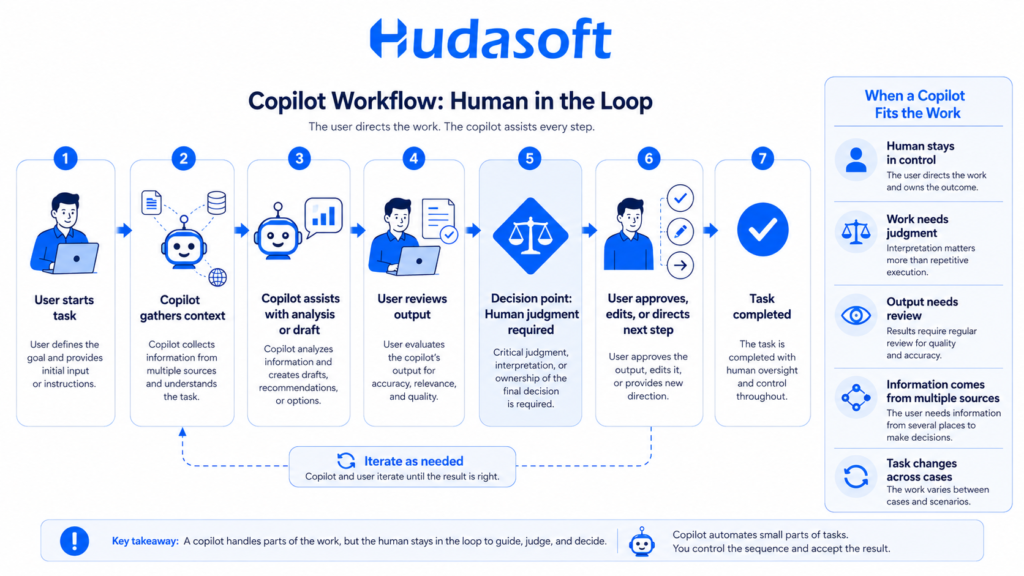
This usually applies when:
- the task changes significantly between cases
- interpretation matters more than repetitive execution
- the user needs information from several sources
- a person must own the final decision
- the output requires regular review
- the main problem involves information processing
- the process contains many judgment-heavy decisions
Examples include technical investigation, coding assistance, document preparation, analysis, research, complex customer conversations, and decision support.
A copilot can automate small parts of these tasks. The user still controls the sequence and accepts the result.
When an AI Agent Fits the Work
A workflow becomes suitable for agent execution when it has a defined objective and enough structure for software to perform permitted steps consistently.
The system needs clear rules around what the agent can access, which actions it can perform, when it needs approval, and where it must stop.
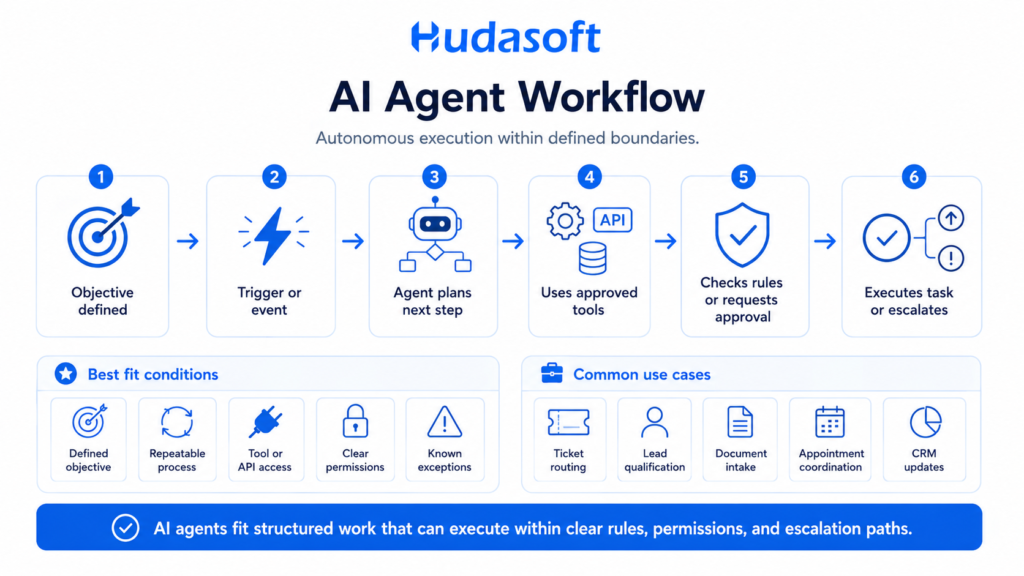
Useful characteristics include:
- a measurable objective
- repeatable process logic
- available tool or API access
- defined execution permissions
- observable success or failure
- known exception types
- clear escalation paths
Examples include:
- ticket classification and routing
- lead qualification
- document intake
- appointment coordination
- CRM maintenance
- order exception handling
- data reconciliation
- recurring reporting
- defined development tasks
- operational event handling
Some workflows combine fixed process rules with decisions that require model reasoning. In that situation, deterministic logic can manage routing and predictable actions, and AI can handle the steps that require interpretation. This is the same distinction that matters when designing AI automation around business workflows. The automation layer defines reliable process execution, and agent logic enters only where the workflow requires AI-based decisions.
That division reduces unnecessary model use and keeps predictable operations inside predictable software logic.
When a Workflow Needs Both
Many workflows contain a mix of human judgment and repeatable execution. A combined architecture can assign those responsibilities separately.
The copilot remains close to the user. The agent operates inside the part of the workflow that has clear objectives and controls.
| Workflow | Copilot Role | Agent Role |
| Customer support | Helps a representative interpret complex cases | Executes defined actions for routine cases |
| Sales | Helps a rep analyze accounts and opportunities | Updates records and performs approved follow-ups |
| Software development | Assists with design, code, and investigation | Executes bounded development tasks |
| Finance | Helps an analyst interpret information | Runs approved reconciliation or reporting steps |
| HR | Helps users understand policies and cases | Completes defined administrative processes |
| Operations | Summarizes conditions and exceptions | Responds to approved events and process states |
This model avoids forcing one interaction pattern across the full process.
A development team provides a clear example. A coding copilot can help an engineer understand a repository or prepare a change. An agent can take a bounded task, inspect project context, use development tools, run validation, and adjust its work based on the result. Hudasoft’s guide to AI agent workflow automation for software development covers that execution model in more detail.
Product Labels Do Not Define System Behavior
Terms such as copilot, assistant, AI agent, and agentic AI do not carry identical technical meanings across every product.
A platform can use the word copilot and still include agents that perform multi-step actions. A product marketed as an agent can require human confirmation through most of its workflow.
Architecture assessment should therefore focus on observable behavior.
A practical review should answer these questions:
- What can initiate the system?
- Can it decide the next step after the initial request?
- Which tools can it invoke?
- Can it create or change data?
- How does it maintain workflow state?
- Which actions require approval?
- What permissions limit its authority?
- What happens when a tool fails?
- Can operators trace its consequential actions?
- Can the workflow reverse or compensate for an incorrect action?
These questions reveal the level of delegated responsibility more clearly than the product label.
How Microsoft Copilot Relates to AI Agents
Microsoft creates an important sub-intent around this topic because users often search for Microsoft Copilot and AI agents together.
Microsoft Copilot Studio currently supports the creation and management of agents and workflows. Microsoft describes these agents as systems that can use organizational knowledge, call tools, interact with business systems, and take actions. Microsoft also supports publishing agents through Microsoft 365 Copilot and other channels.
This means Microsoft Copilot and an AI agent do not always represent two mutually exclusive products.
The relevant architecture questions remain the same:
- what the Copilot experience handles
- what the agent handles
- what data each component can access
- which actions the agent can execute
- where human approval applies
- how permissions constrain the workflow
- how teams monitor actions and outcomes
Microsoft also distinguishes between agent-building options based on audience, deployment scope, functionality, and governance requirements.
The same principle applies outside Microsoft products. The implementation model matters more than the product name.
What Changes When a Copilot Becomes an Agent
Giving an AI system more execution authority changes the surrounding software architecture.
A copilot may need model access, application context, retrieval, authentication, and a user interface. An agent may also need tool contracts, workflow state, execution policies, approval logic, monitoring, and recovery mechanisms.
These additions determine whether the system can perform operational work safely and predictably.
Tool Interfaces Need Explicit Contracts
Every tool available to an agent needs a defined interface.
The implementation should specify:
- available operations
- accepted input
- returned output
- authentication
- permission scope
- validation behavior
The agent should receive only the tools required for its task.
A narrow tool surface limits unintended actions and makes the execution path easier to test.
Permissions Need to Match the Workflow
Agent permissions should match the responsibility assigned to the system.
A support agent may need permission to read account information and update ticket status. The same agent may need approval before issuing a refund.
A sales agent may create tasks and update lead fields without receiving access to contract records or billing data.
This approach makes the authority model explicit.
Longer Workflows Need State and Orchestration
A multi-step process needs a way to record progress and coordinate execution.
Short tasks may only require temporary state. Longer workflows can require durable state, approval events, queues, timeouts, retries, and recovery after an interrupted execution.
Once those components interact across a longer execution path, the agentic AI architecture needs to coordinate reasoning, tools, state, memory, orchestration, and control logic as one system.
That architecture should follow the workflow requirements rather than add complexity that the use case does not need.
Execution Needs Validation and Recovery
An agent needs a method for checking whether an action produced the expected result.
Depending on the workflow, the system can require:
- schema validation
- business-rule validation
- status verification
- retry limits
- duplicate-action protection
- compensating actions
- escalation
- human review
Recovery logic should match the consequence of the action. A failed information lookup requires a different response than an incorrect transaction.
Operators Need Execution Visibility
Monitoring an agent requires more than recording the final model response.
Useful execution records can include:
- initiating event
- relevant context
- selected action
- tool request
- tool result
- approval event
- resulting system state
- error
- retry
- final outcome
These records support debugging, evaluation, incident analysis, and governance.
Agent Scope Also Changes Development Cost
Implementation effort grows when an agent requires more tools, integrations, execution paths, approval rules, validation, and monitoring.
A bounded agent that performs one task has a smaller engineering surface than a system that coordinates several applications and maintains state across a longer process. These architecture choices directly affect AI agent development cost because each additional integration and execution path adds implementation, testing, and operational requirements.
Cost estimation therefore needs the workflow definition first. An agent category alone does not describe enough technical scope to produce a meaningful estimate.
Copilot, AI Agent, and Agentic System Cover Different Scopes
A copilot, an AI agent, and an agentic system can support different levels of responsibility inside the same technology environment.
The distinction becomes useful when a workflow expands beyond one interaction or one delegated task.
A copilot assists a person during work.
An AI agent executes a bounded objective within defined permissions.
An agentic system coordinates a broader execution environment that can include planning, tools, workflow state, and several specialized agents.
Consider a customer service operation.
A copilot can help a representative understand a complex case.
An AI agent can resolve a defined category of requests.
A broader agentic system can coordinate classification, account retrieval, policy checks, specialized agents, approval workflows, system updates, and exception handling.
That larger scope requires coordination across responsibilities and system boundaries. Agentic AI development addresses this type of orchestration by defining agent roles, workflow dependencies, tools, memory requirements, governance controls, and production monitoring.
The workflow should justify that additional architecture.
How to Choose Between a Copilot and an AI Agent
The decision starts with the work itself. Model selection, framework selection, and vendor selection come after the workflow defines what the system needs to accomplish.
A useful assessment can follow five stages.
Define the Outcome
Describe the expected result in operational terms.
Examples include:
- qualify incoming leads
- reduce support handling time
- process submitted documents
- prepare account reviews
- coordinate appointments
- reconcile records
- investigate application incidents
A broad objective such as “add AI to customer service” does not establish enough scope for an architecture decision.
Map the Workflow and Human Decisions
Document the current sequence of events, decisions, systems, and handoffs.
Identify:
- what starts the work
- what information the user needs
- which systems participate
- which decisions require judgment
- which steps follow repeatable rules
- where delays occur
- where exceptions occur
This map separates tasks that need assistance from tasks that can support delegated execution.
Define System Access and Authority
List the data sources and applications the AI needs to use.
Then define what the system can do with each one:
- read information
- search information
- create records
- update records
- initiate an operation
- communicate externally
- trigger another workflow
For every consequential action, decide whether the system can execute automatically, execute under specific conditions, request approval, or only recommend the action.
This creates a concrete authority model.
Define Failure and Escalation Paths
The workflow needs a defined outcome when the system cannot continue safely.
Escalation conditions can include:
- missing information
- conflicting data
- unsupported requests
- failed tools
- policy exceptions
- restricted actions
- low-confidence classifications
- conditions that require human judgment
The system should also preserve enough state for a person or another process to continue the task.
Estimate the Full Implementation Scope
The model represents only one component of an AI application.
Planning should also account for data preparation, retrieval, application logic, integrations, authentication, infrastructure, testing, monitoring, security, and maintenance. These requirements shape the broader AI development cost for both copilot and agent implementations.
A cost estimate becomes useful only after the team defines the workflow, system dependencies, access model, operating volume, and production controls.
Conclusion
The difference between an AI copilot and an AI agent comes down to responsibility inside the workflow.
A copilot helps a person understand information, produce output, and make decisions while the person continues to direct the work. An AI agent receives authority over a defined objective and can execute permitted steps without requiring a new instruction at every transition.
The appropriate design depends on workflow structure, required judgment, system access, execution rights, state, approvals, failure impact, and completion criteria. Some workflows need only a copilot. Others support bounded agent execution. Processes that combine human judgment with repeatable operational work can use both.
The same workflow analysis should guide implementation. Hudasoft designs AI applications around these operating boundaries, including system integrations, execution permissions, approval controls, observability, and production governance. Teams that need delegated task execution can evaluateAI agent development services against the specific actions, systems, and controls their workflow requires.
Defining those requirements first gives the project a clear architecture before development begins.
Frequently Asked Questions
Is Microsoft Copilot an AI agent?
Microsoft Copilot and AI agents can overlap in capability, but the terms do not describe the same architecture in every case. Microsoft currently supports agents through Copilot Studio and Microsoft 365 Copilot. These agents can use organizational knowledge, tools, workflows, and connected systems to perform defined tasks.
Can Microsoft Copilot use AI agents?
Yes. Microsoft allows agents to work through Microsoft 365 Copilot and other supported channels. Copilot Studio provides tools for creating, managing, connecting, and publishing those agents.
Can an AI agent work without human supervision?
An AI agent can execute permitted steps without continuous human input. The workflow should still define approval requirements, permission limits, escalation conditions, and actions that the system cannot perform independently.
What is the difference between an AI assistant, copilot, and AI agent?
An AI assistant generally responds to user requests. A copilot supports a person inside an ongoing workflow. An AI agent can receive a defined objective and execute permitted steps toward completing it. Product terminology varies, so workflow control and execution authority provide a more reliable distinction.
Can AI agents and copilots work together?
Yes. A copilot can provide the user-facing interaction layer, and one or more agents can execute selected tasks behind that interface. This structure fits workflows that combine human judgment with controlled automation.
How do you choose between an AI copilot and an AI agent?
Use a copilot when a person needs to remain in control of the task and make most important decisions. Use an agent when the workflow has a defined objective, clear system access, bounded execution permissions, measurable completion criteria, and explicit exception handling.

