


An AI integration strategy is a structured plan for embedding artificial intelligence into existing business processes, data environments, applications, and decision workflows. It connects AI use cases to measurable business goals while defining the data, architecture, governance, security, people, and operating model required to move from experiments to reliable production systems.
The business value can become substantial when AI connects with a defined operational workflow. IBM cites Coca-Cola Europacific Partners as generating more than $40 million in overall business benefits from an AI-powered procurement transformation, including $5 million in annual cost and avoidance savings. The example shows why integration decisions must connect technology with business processes, available data, system ownership, and measurable outcomes.
A practical strategy starts with a defined business problem and a documented baseline. Teams can then assess readiness, prioritize a suitable use case, select an integration pattern, establish controls, run a contained pilot, measure results, and scale the solution when the evidence supports expansion.
Quick Takeaways
- Start with a measurable business problem, not a model or tool.
- Assess data quality, access, privacy, integration points, and technical readiness before implementation.
- Choose platforms based on use-case fit, interoperability, governance, security, total cost, and scalability.
- Use a modular architecture so models, data sources, orchestration layers, and applications can evolve independently.
- Measure ROI against a pre-integration baseline using cost, cycle time, quality, capacity, revenue, or risk metrics.
- Treat governance, workforce adoption, monitoring, and change management as part of the integration strategy.
What Is an AI Integration Strategy?
An AI integration strategy defines how an organization will connect AI capabilities with the systems and workflows it already uses. It covers the integration of artificial intelligence across business applications, APIs, data platforms, knowledge bases, cloud services, analytics tools, customer systems, and employee workflows.
The strategy should specify which business outcomes AI is expected to improve, what data it can use, how it will connect with existing software, who approves high-impact outputs, how performance will be measured, and how the organization will govern the system after deployment.
An AI strategy determines where artificial intelligence can support business priorities and how the organization will invest in those opportunities. An AI integration strategy defines how an approved capability will connect with existing data, applications, workflows, permissions, and operating controls. The resulting AI integration plan then assigns delivery tasks, owners, milestones, and acceptance requirements.
| Document | What It Defines |
| AI strategy | Business priorities, investment direction, and organizational AI goals |
| AI integration strategy | Data, system, workflow, architecture, governance, and ownership decisions |
| AI integration plan | Tasks, responsibilities, milestones, testing, deployment, and handover |
AI integration strategies differ by organization because every business has different systems, data restrictions, workflow risks, and operating responsibilities.
Why Businesses Need a Structured AI Integration Strategy
A defined strategy prevents individual AI pilots from becoming disconnected tools with unclear data access, ownership, integration requirements, or measures of success.
Productivity, decision support, automation, and workforce adoption depend on a defined integration plan. The plan connects each AI initiative with business ownership, data, systems, controls, and measurable outcomes.
- Business alignment: AI initiatives are tied to a specific operational or customer outcome.
- Data readiness: teams know which data sources are authoritative, accessible, current, and permitted for AI use.
- System compatibility: integration requirements are identified before a pilot becomes dependent on brittle manual work.
- Governance: ownership, permissions, review rules, security controls, and monitoring are defined early.
- Scalability: the architecture can support more users, workflows, models, and data without a complete rebuild.
- Measurement: teams can compare post-integration performance with a documented baseline.
Foundational Steps for an Enterprise AI Integration Strategy
The following eight steps connect business objectives with data readiness, integration architecture, governance, pilot validation, financial measurement, and production ownership. Together, they turn an approved AI opportunity into a controlled path toward deployment and scale.
1. Define the Business Problem and Success Metric
Identify the workflow, decision, or customer experience that needs improvement. Document the current baseline before introducing AI. Useful measures include cycle time, handling time, error rate, conversion rate, throughput, cost per transaction, customer satisfaction, developer velocity, or revenue contribution.
Business case record
Document the target workflow, current baseline, accountable owner, success metric, and improvement threshold that would justify further investment.
2. Assess AI and Data Readiness
Map the applications, data sources, APIs, permissions, infrastructure, and skills involved in the target process. Review data for accuracy, completeness, consistency, accessibility, privacy, and ownership.
Data readiness deserves its own approval gate because proprietary information often determines whether an integrated system can produce relevant business outputs. An IBM Institute for Business Value study found that 72% of CEOs consider proprietary data essential to unlocking value from generative AI. Teams should therefore confirm data quality, access rights, ownership, refresh cycles, and system compatibility before approving a pilot.
If the use case depends on internal knowledge, determine whether retrieval, indexing, permissions, and document freshness can support it.
Teams should also test data readiness at the workflow level. For example, a customer-support assistant may need product documentation, account data, and ticket history. Different owners govern each source and maintain separate refresh cycles and permission rules. Documenting these dependencies early helps teams identify gaps before they affect the pilot.
Readiness map
Map the required data sources, business applications, APIs, access rights, quality gaps, infrastructure dependencies, and skills needed for the proposed use case.
3. Prioritize the Right AI Use Case
Score candidate use cases by business value, feasibility, data readiness, integration complexity, risk, and measurability. A contained workflow with a clear baseline is usually easier to validate than an enterprise-wide deployment with unclear ownership.
Use-case scorecard
Compare candidate use cases by business value, technical feasibility, data readiness, integration complexity, operational risk, and ability to measure results.
4. Choose the Integration Pattern
Decide how AI will interact with the existing environment. Common patterns include API-based model access, embedded copilots, retrieval-augmented generation, AI agents with approved tools, event-driven automation, predictive models connected to operational systems, and hybrid architectures that combine several patterns. For workflows that require custom AI applications, RAG systems, or agent-based capabilities, AI development services can help businesses build these capabilities around their existing applications, data sources, and operational requirements.
The integration pattern should match the work being automated. Retrieval-augmented generation fits use cases that depend on current private knowledge, agent-based workflows fit approved multi-step actions, predictive models fit scoring and forecasting, and direct model APIs fit focused generation or classification. Matching the pattern to the workflow reduces unnecessary architectural complexity.
Architecture decision
Record the selected integration pattern, affected systems, technical dependencies, operating requirements, and reasons for rejecting other viable options.
5. Design Governance, Security, and Human Oversight
Define what data the system can access, which actions it can take, how identities and permissions are enforced, what outputs require approval, how prompts and responses are logged, and how incidents are handled. High-impact decisions should have controls appropriate to their legal, financial, safety, privacy, or customer impact.
Governance should reflect the impact of the use case. An internal drafting assistant may need access controls, logging, and employee review, while an AI workflow that changes customer records or influences financial decisions needs stricter approval rules, auditability, exception handling, and rollback procedures.
Control matrix
Assign data permissions, action limits, approval requirements, logging rules, incident escalation, exception handling, and rollback responsibility.
6. Run a Controlled Pilot
Integrate AI into a bounded workflow with a representative user group. Test accuracy, latency, usability, security, failure modes, operating cost, and human review requirements. Capture both system metrics and employee feedback. Teams preparing for this stage can use an artificial intelligence implementation framework to map the use case, data requirements, integration points, responsibilities, testing criteria, and success metrics before deployment.
A useful pilot tests the complete workflow, not only the model. Teams should measure how reliably data reaches the AI system, whether employees can review or correct outputs, how exceptions are routed, and whether the integrated process actually reduces friction for the people using it.
Pilot plan
Define the pilot scope, participants, test data, workflow scenarios, acceptance thresholds, review requirements, operating budget, and stop conditions.
7. Measure Business Impact and ROI
Compare the pilot with the original baseline. Separate model quality from business value. A system can produce technically strong outputs and still fail to improve the workflow if employees do not use it, integrations add friction, or review costs exceed the value created.
ROI should be evaluated over a representative operating period, so temporary pilot effects do not distort the result. Track inference, infrastructure, monitoring, human review, and support costs alongside the business improvement to decide whether the use case is ready to scale.
Impact assessment
Compare business improvement, system performance, user adoption, human-review effort, and total operating cost against the original baseline.
8. Scale, Monitor, and Improve
Move successful use cases into production with monitoring for quality, cost, latency, security, adoption, and business KPIs. Revisit prompts, models, retrieval sources, integrations, permissions, and workflow design as requirements change.
Scaling also requires operational ownership. Define who monitors quality and cost, who can change prompts or models, how incidents are escalated, and when the integration should be paused or rolled back. These controls matter more as AI reaches additional users and business-critical workflows.
Production operating plan
Assign monitoring, maintenance, change approval, user support, incident response, model updates, and future scaling responsibilities.
Best Practices for Developing an AI Integration Strategy
Strong execution depends on decisions that remain consistent across business planning, technical design, pilot validation, and production operation. These practices help teams maintain clear ownership, reliable data access, architectural flexibility, and measurable performance throughout the integration lifecycle.
- Maintain business and technical ownership. Assign one business owner to the target outcome and one technical owner to the system dependencies. Operations, IT, data, security, legal, and affected users can support specific decisions without dividing final accountability.
- Preserve source-system authority. Keep customer, financial, inventory, employee, and operational records under the controls of their existing systems. AI applications should use the same permissions, data restrictions, and update rules that govern those records.
- Keep models and integration components replaceable. Separate model access, orchestration, business rules, data retrieval, and application interfaces. This structure allows teams to change a model or connector without rebuilding the complete workflow.
- Use approval gates for higher levels of commitment. Define the evidence required to approve the use case, launch the pilot, enter production, and expand usage. Each decision should consider business value, system performance, operating cost, security, and user adoption.
- Maintain a record of key decisions and dependencies. Track approved data sources, models, prompts, APIs, permissions, evaluation criteria, owners, and downstream systems. Update the record whenever a technical or operating change affects the workflow.
- Measure adoption inside the actual workflow. Monitor whether employees use, correct, override, or avoid the AI-supported process. These signals show whether the integration improves the work or introduces new review effort and operational friction.
How to Choose AI Integration Tools and Platforms
A mid-size business should choose AI integration tools by matching platform capabilities with its priority workflows, current applications, available data, security requirements, and operating capacity. A growing business also needs enough flexibility to support additional models, users, data sources, and governance requirements as adoption expands.
Match the AI Capability to the Workflow
Before comparing platforms, define the type of AI capability the approved workflow requires. Each capability introduces different data, integration, permission, evaluation, and operating requirements.
| AI Capability | Best-Fit Workflows | Typical Integration Requirements |
| Employee copilots | Drafting, summarization, enterprise search, meeting support, and employee productivity | Productivity application connections, approved knowledge access, identity controls, citations, and employee review |
| AI agents | Bounded workflows that require multiple steps, systems, or approved actions | Orchestration, tool permissions, workflow state, action limits, approval gates, exception handling, and audit logs |
| Predictive AI | Forecasting, scoring, anomaly detection, demand planning, and maintenance prioritization | Structured data pipelines, model serving, output thresholds, performance monitoring, and periodic validation |
| Generative AI and RAG | Enterprise knowledge assistance, customer support, document analysis, and content generation | Document connectors, retrieval pipelines, source permissions, freshness controls, citations, prompt controls, and output evaluation |
| AI-enabled automation | Repetitive workflows involving records, documents, notifications, approvals, or system updates | APIs, events, workflow rules, queues, validation, retries, exception routing, and rollback procedures |
| Computer vision | Visual inspection, object detection, damage assessment, quality monitoring, and image classification | Image or video ingestion, model inference, storage, confidence thresholds, human validation, and performance monitoring |
The selected capability determines the technical functions that a platform must support. For example, an enterprise knowledge assistant needs permission-aware retrieval and source citations, while an AI agent that updates business records needs tool-level permissions, approval rules, and complete action logs.
Evaluate the Tools and Platforms
After defining the required capability, evaluate whether each platform can support the complete workflow within the organization’s technical, security, financial, and operational constraints. A broad feature list does not demonstrate that a platform can satisfy the approved use case.
| Selection Factor | What to Evaluate | Why It Matters |
| Use-case fit | Support for the selected capability, workflow steps, required outputs, data sources, and permitted actions | Prevents teams from choosing broad platform features that do not satisfy the approved use case |
| Integration support | APIs, SDKs, connectors, webhooks, event streams, and identity systems | Strong integration support reduces custom development and simplifies long-term maintenance |
| Data and RAG capabilities | Vector search, permissions, document connectors, freshness controls, and citations | These capabilities matter when AI uses private or frequently changing business knowledge |
| Security and governance | SSO, role-based access, encryption, audit logs, data residency, and policy controls | These controls determine whether the platform meets organizational risk requirements |
| Model flexibility | Support for different models, providers, and deployment options | Model flexibility lets teams match each workload with suitable performance, cost, privacy, and deployment requirements |
| Observability and evaluation | Tracing, quality evaluation, latency, usage, cost, and error monitoring | Production teams need these capabilities to identify performance problems and control operating costs |
| Scalability | Rate limits, concurrency, regional availability, and workload isolation | These factors determine whether a successful pilot can support production demand |
| Total cost | Licensing, inference, infrastructure, integration, monitoring, maintenance, and support | Subscription or platform pricing represents only one part of the complete operating cost |
A Practical Platform Selection Process
- Define two or three priority use cases and record their non-negotiable business, data, integration, security, and operating requirements.
- Map the existing applications, data sources, cloud environment, identity provider, APIs, and integration methods involved in each workflow.
- Create a weighted scorecard covering use-case fit, interoperability, security, data access, model support, observability, scalability, vendor support, and total cost.
- Prototype the connection with the highest technical or operational risk before making a wider platform commitment.
- Test the platform with representative workflow data, expected user permissions, review requirements, failure scenarios, and production-level integration conditions.
- Compare total cost and operating effort across a realistic usage range that includes infrastructure, inference, monitoring, maintenance, and internal support.
Record the selected platform, evaluation results, cost assumptions, technical dependencies, implementation risks, and reasons for rejecting other viable options. The chosen platform supports the wider strategy, but it does not replace the business objectives, data requirements, governance controls, ownership decisions, and performance criteria that guide the integration.
How to Build a Scalable AI Integration Architecture
A scalable AI integration architecture separates business applications from model-specific logic. This makes it easier to replace models, add new data sources, enforce controls, and support multiple AI use cases.
A practical example is a customer-service workflow in which a CRM sends the user request and permitted account context to an orchestration layer. The orchestration layer retrieves approved knowledge, sends the relevant context to the AI model, applies business rules, and returns a response or approved action to the CRM. Identity controls, logs, evaluation, and human escalation operate across the flow.
- Experience layer: Employee applications, customer interfaces, CRM platforms, service portals, and operational software provide the points where users interact with AI. This layer should present outputs, approvals, citations, errors, and escalation options within the existing workflow.
- Integration and orchestration layer: APIs, workflow engines, business rules, queues, event services, and agent orchestration coordinate how information and actions move between systems. This layer also manages retries, exceptions, validation, and workflow state.
- AI layer: Language models, predictive models, embedding models, computer vision systems, and specialized AI services produce the required analysis or output. Teams should select each model according to task accuracy, latency, operating cost, privacy, and deployment requirements.
- Enterprise data and knowledge layer: Databases, warehouses, document repositories, vector stores, and approved external sources provide business context. The architecture must preserve source permissions, data freshness, provenance, and the authority of systems of record.
- Governance and security layer. Identity controls, role-based access, policy enforcement, audit logs, data protection, and human approval define what the system can access and perform. These controls should apply consistently across models, applications, data sources, and connected actions.
- Observability layer. Monitoring should track model quality, retrieval quality, latency, cost, usage, failures, security events, and business KPIs. These signals help teams identify declining performance, investigate incidents, control costs, and decide when to revise or pause the integration.
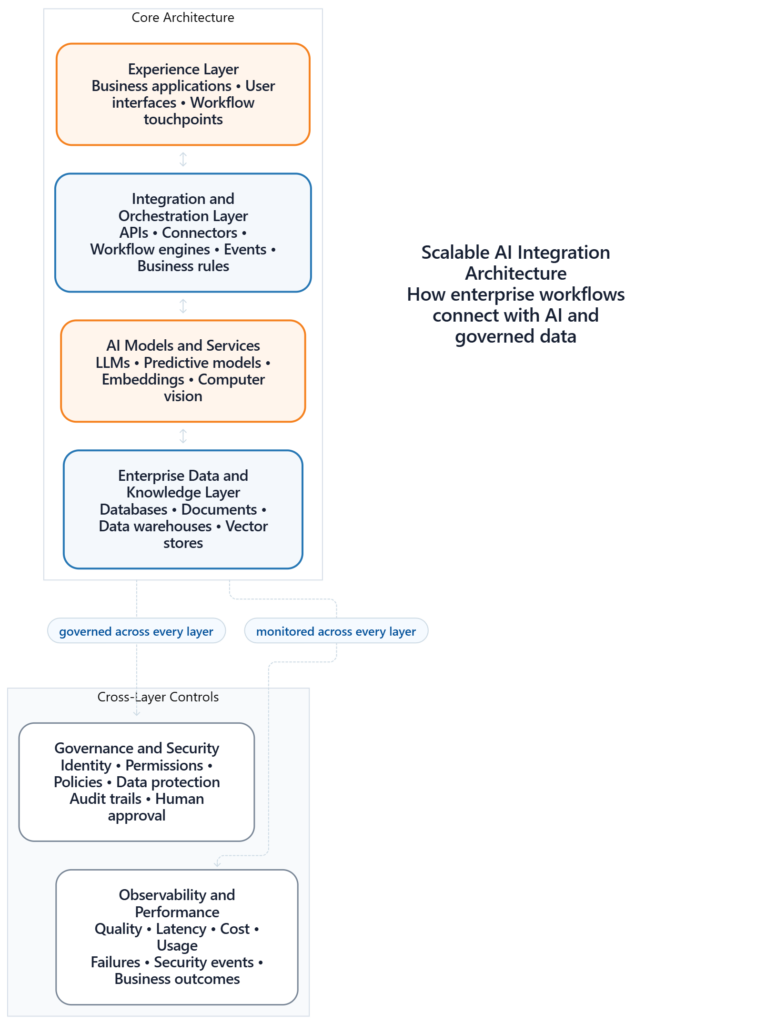
For future growth, keep these layers modular and use documented interfaces. This allows teams to change a model or retrieval component without redesigning the entire customer or employee workflow. When the architecture needs to connect AI models with enterprise data, APIs, CRM platforms, knowledge systems, or other existing applications, AI integration services can support the technical integration across those systems.
How to Budget for AI Integration and Measure ROI
An AI integration budget should account for the work required to build the initial solution and the recurring resources needed to operate it. Teams should also establish a baseline before the pilot so they can compare costs with verified business outcomes.
Implementation Cost Categories
Initial costs depend on the selected use case, data readiness, affected systems, integration complexity, security requirements, model choice, and level of customization. Fragmented data, legacy applications, custom controls, and complex review workflows can increase the work required before launch.
Implementation costs may include:
- Discovery, process mapping, and solution architecture
- Data cleanup, migration, labeling, indexing, and retrieval preparation
- API, middleware, connector, and application development
- Security controls, governance requirements, compliance reviews, and testing
- Pilot configuration, evaluation design, and acceptance testing
- Employee training, workflow preparation, and change management
Ongoing Operating Costs
The budget should also cover the resources required to run, monitor, support, and improve the integration after deployment.
Ongoing costs may include:
- Model inference, token usage, hosting, and compute
- Vector databases, storage, and data transfer
- Monitoring, logging, evaluation, and observability
- Human review and operational support
- Model updates, prompt changes, and retrieval maintenance
- Connector maintenance and changes to integrated applications
- Security reviews, incident response, and governance oversight
Usage volume can change these costs significantly. Teams should therefore estimate operating costs at the expected pilot volume and at the volume anticipated after wider deployment.
Establish a Pre-Integration Baseline
Before starting the pilot, document how the target workflow currently performs. The baseline should use the same definitions, data sources, measurement periods, and ownership rules that the team will apply during pilot and production evaluation.
Depending on the use case, the baseline may include processing time, cost per transaction, error rate, rework, throughput, conversion, downtime, escalation rate, customer satisfaction, or employee adoption.
Without a reliable baseline, teams cannot determine whether AI produced an improvement or whether another operational change influenced the result.
Calculate AI Integration ROI
Measure AI integration ROI against the business process that existed before deployment. The calculation should capture the financial value created by the integration and the total cost required to produce that value.
ROI = (Measurable financial benefit − Total AI integration cost) ÷ Total AI integration cost × 100
Measurable financial benefits may include released labor capacity, lower processing costs, reduced rework, faster cycle times, increased conversion, lower churn, reduced downtime, avoided risk, or additional revenue.
Total AI integration cost should include initial implementation expenses and the operating costs incurred during the measurement period.
ROI Measurement Framework
| Metric type | Example measures | Measurement method |
| Efficiency | Cycle time, handling time, throughput, hours saved | Compare the pre-integration baseline with pilot and production performance. |
| Quality | Error rate, rework, escalation rate, accuracy | Apply the same quality definition before and after deployment. |
| Customer | Resolution time, conversion, satisfaction, retention | Track metrics directly influenced by the integrated workflow. |
| Financial | Cost per transaction, avoided cost, revenue contribution | Convert verified operational changes into documented financial value. |
| Adoption | Active users, task completion, acceptance rate | Determine whether people consistently use the integrated workflow. |
| Risk | Policy violations, security incidents, manual exceptions | Measure whether the integration reduces or introduces operational risk. |
Use Approval Gates to Control Investment
Pilot approval: Determine whether the expected business value, available data, technical feasibility, and estimated cost justify a controlled pilot.
Production approval: Confirm that the pilot met its business, technical, adoption, security, and risk thresholds before connecting it to a live workflow.
Scale approval: Verify that the measured value justifies extending the integration to additional users, workflows, locations, or infrastructure.
Each approval should result in a decision to stop, revise, proceed, or scale. This approach prevents teams from committing larger budgets before the integration demonstrates measurable value under realistic operating conditions.
Where AI Integration Strategies Fail
AI integration strategies often fail when teams overlook dependencies between business objectives, data, existing systems, governance, employee adoption, and operating ownership. Each failure point connects to a specific stage of the eight-step framework and should trigger corrective action before further investment.
| Failure point | Strategy stage affected | Required response |
| Poor data quality and fragmented access | Step 2: Assess AI and Data Readiness | Audit relevant sources, assign data ownership, address quality gaps, and define access, freshness, and consistency requirements. |
| Legacy-system compatibility | Step 4: Choose the Integration Pattern | Map available interfaces and test the highest-risk connection before finalizing the architecture. Use APIs, middleware, events, or targeted modernization where appropriate. |
| Skills gaps | Steps 6 and 8: Pilot and Production Ownership | Combine business owners with AI, data, security, architecture, and integration expertise. Train the employees who will operate, review, or support the system. |
| Cost uncertainty | Steps 1, 7, and 8: Business Case, ROI, and Scale | Estimate implementation and operating costs, define usage limits, measure cost per completed task, and expand only after the integration demonstrates sufficient value. |
| Hallucination, bias, and unreliable outputs | Steps 5, 6, and 8: Governance, Evaluation, and Monitoring | Test representative scenarios, use authoritative sources where appropriate, define output controls, require human review for higher-risk actions, and monitor production performance. |
| Security and privacy risks | Step 5: Governance, Security, and Human Oversight | Apply least-privilege access, identity controls, encryption, data-classification rules, audit logging, and approved model and data-handling policies. |
| Low employee adoption | Steps 6 and 8: Pilot Design and Production Operation | Involve users in workflow mapping and pilot testing. Address practical pain points and measure adoption alongside technical and business performance. |
| Unclear governance | Steps 5 and 8: Control Design and Operating Ownership | Assign decision rights for data access, model approval, exceptions, incidents, high-impact outputs, system changes, and production support. |
Teams should review these failure points at each approval gate. If the available evidence does not satisfy the required business, technical, security, adoption, or ownership criteria, the organization should revise or stop the initiative before committing additional resources.
The Human Side of AI Integration
AI integration changes how employees search for information, prepare work, make decisions, and interact with systems. Employees need to understand what the AI can do, where it can fail, what information it can access, and when human review is required.
Process mapping and employee feedback can reveal where AI has practical value. McChrystal Group highlights process mapping, passive workflow data, employee surveys, and cross-functional governance as useful inputs for identifying AI opportunities and supporting enterprise-wide enablement.
Worked Example: AI Integration in a Dealership Service Workflow
A dealership service workflow shows how the eight-step framework translates into practical integration decisions. In this example, an AI assistant helps employees interpret service requests, retrieve approved information, check appointment availability, and prepare customer communications without replacing the dealership’s authoritative systems.
| Strategy step | Application within the service workflow |
| 1. Define the business problem | Reduce the time employees spend interpreting, routing, and responding to routine service requests while maintaining control over appointments and customer commitments. |
| 2. Assess AI and data readiness | Review customer records, vehicle information, service history, scheduling availability, service documentation, and communication data. Confirm ownership, accuracy, access rights, and refresh frequency for each source. |
| 3. Prioritize the use case | Limit the initial scope to service-request intake, request classification, information retrieval, appointment availability, and response preparation. Exclude vehicle diagnosis, repair authorization, and final pricing decisions. |
| 4. Choose the integration pattern | Use an orchestration layer to connect the AI assistant with the CRM, dealership management system, scheduling platform, and approved knowledge sources. Each business platform remains the system of record. |
| 5. Define governance and oversight | Restrict system access by role, log data retrieval and proposed actions, and require employee approval for unusual requests, pricing information, customer commitments, or cases involving uncertain information. |
| 6. Run a controlled pilot | Test the workflow with a limited group of service employees, representative request types, approved test data, predefined acceptance thresholds, and clear stop conditions. |
| 7. Measure business impact | Compare handling time, completion rate, response accuracy, escalation rate, employee adoption, customer outcomes, and cost per completed request with the pre-integration baseline. |
| 8. Scale and operate | Assign responsibility for monitoring, connector maintenance, access reviews, knowledge updates, incident response, and workflow changes. Expand only after the pilot meets its business, technical, and risk thresholds. |
The resulting workflow follows a controlled path:
Customer service request → AI interpretation → Approved data retrieval → Scheduling check → Response preparation → Employee approval → System update
The same decision structure can support other AI in automotive workflows, including inventory assistance, lead qualification, maintenance prioritization, and vehicle inspection. Each workflow still requires its own data assessment, integration design, authority limits, evaluation criteria, and operating ownership.
From AI Tools to an Integrated Operating Model
Businesses often evaluate tools such as ChatGPT, Claude, Microsoft Copilot, Notion AI, and other productivity assistants. A useful evaluation groups these tools by the role they perform within the operating model and the systems they need to access.
- Employee copilots for drafting, summarization, search, and productivity
- AI agents for bounded multi-step workflows with approved tools
- Predictive AI for forecasting, scoring, anomaly detection, and maintenance
- Generative AI and RAG for enterprise knowledge and customer assistance
- AI-enabled automation for repetitive operational workflows
- Computer vision for inspection, monitoring, and visual analysis
Tool selection should follow the business requirement, data model, integration architecture, security controls, and ROI target.
Conclusion
A strong AI integration strategy connects business outcomes, data, architecture, tools, governance, people, cost, and measurement in one implementation plan. Organizations can begin with a bounded use case, establish a reliable baseline, validate the integration in real workflows, and expand when the evidence supports scale.
The goal is a maintainable operating capability: AI connected to the right systems, using the right data, under the right controls, with measurable value for the business.
Frequently Asked Questions
1. What should an AI integration strategy document include?
Answer: An AI integration strategy document should include the business problem, target workflows, expected outcomes, current performance baseline, prioritized use cases, and criteria for measuring success. It should also map the required applications, data sources, APIs, infrastructure, user roles, and system dependencies. The document should define the selected integration patterns, data-access rules, security controls, human-review requirements, and limits on AI actions. It should also cover pilot scope, evaluation criteria, implementation and operating costs, ownership responsibilities, monitoring requirements, approval gates, and conditions for stopping, revising, or scaling each use case. These elements give business and technical teams a shared basis for making integration decisions.
2. Who should own an AI integration strategy?
Answer: Ownership of an AI integration strategy should sit with a designated business leader who remains accountable for the operational outcome and investment decision. A technical leader should share responsibility for architecture, data access, security, integration feasibility, and production operation. The wider governance group should include representatives from operations, IT, data, security, legal or compliance, finance, and the employees who use the affected workflow. Each use case also needs a named process owner who can approve requirements, resolve workflow questions, and evaluate results. Cross-functional participation supports the strategy, but it should not replace individual accountability for decisions, risks, performance, and operating ownership.
3. What is the difference between an AI integration strategy and an AI integration plan?
Answer: The difference between an AI integration strategy and an AI integration plan lies in the type of decisions each one governs. The strategy explains why the organization should integrate AI, which business outcomes matter, which use cases deserve priority, how AI will connect with existing systems, what risks require controls, and what evidence will justify further investment. The integration plan explains how the team will execute an approved use case. It defines tasks, timelines, responsibilities, dependencies, technical activities, testing procedures, budgets, and deployment milestones. The strategy provides long-term direction and decision criteria, while the plan converts those decisions into coordinated implementation work. An organization may maintain one overall strategy and create separate plans for individual use cases.
4. How often should an AI integration strategy be reviewed?
Answer: An AI integration strategy should be reviewed at scheduled governance intervals and whenever a material change affects its assumptions, risks, or expected value. Review triggers can include a new use case, a different model or provider, changes to source systems, new data-access requirements, security incidents, regulatory or internal policy changes, unexpected operating costs, poor user adoption, or declining model and retrieval performance. Teams should also review the strategy before moving from pilot to production and before extending an integration to additional workflows or users. Active pilots may require more frequent review than stable production use cases. Each review should record the evidence considered, decisions made, required changes, accountable owners, and the next approval point.

