












Hero Background

Enterprise AI Chatbot Development Services

Build AI Chatbots That Work Inside Enterprise Systems

Hudasoft provides an enterprise AI chatbot development service for businesses that need secure chatbots connected with CRMs, ERPs, helpdesks, internal documents, and customer workflows. Our team designs chatbots for support, employee self-service, lead handling, and operations where accuracy, access control, and escalation matter.

Book a Free Consultation

Company 1
Company 3
Company 2
Company 8
Company 9
Company 10
Company 4
Company 5
Company 6
Company 6
Company 6

Where Enterprise Chatbot Development Fits in Your Operations

Hudasoft provides chatbot development for enterprises that need RAG, secure integrations, access controls, and human escalation. Each chatbot works with approved business data, defined workflows, and user roles, so customer or employee requests stay easier to manage.

Models Deployed
100+ predictive models deployed across industries
Forecast Accuracy
90%+ accuracy in forecasting outcomes
Data Sources
50+ data sources integrated
Business Impact
25% average increase in operational efficiency

What Our Enterprise AI Chatbot Development Service Covers

Hudasoft builds enterprise chatbot solutions with controlled responses, RAG-based knowledge access, system connections, user permissions, escalation paths, and workflow actions, so customer and employee requests can move through business operations with clearer control.

Service Tab

Control how the chatbot interprets user requests, chooses approved responses, asks follow-up questions, and handles uncertain or incomplete inputs.

Service Tab

Use approved documents, policies, FAQs, product data, support records, and databases as the source base for chatbot answers.

Service Tab

Connect the chatbot with CRM, ERP, helpdesk, HRM, booking systems, knowledge bases, and internal tools through secure APIs.

Service Tab

Limit answers, actions, records, and data visibility based on user role, department, account type, or workflow permission.

Service Tab

Route sensitive, complex, failed, or high-value conversations to the right team with the required context and request history.

Service Tab

Allow the chatbot to create tickets, update records, collect forms, check statuses, schedule requests, and support routine business tasks.

Service Tab

Track unresolved queries, repeated questions, fallback patterns, topic demand, escalation reasons, and knowledge gaps across chatbot conversations.

Service Tab

Support chatbot updates, knowledge changes, integration checks, response improvements, and issue resolution after the chatbot is live.

Production Gaps in Enterprise Chatbot Projects

Enterprise chatbot work needs clear controls for knowledge access, system actions, user permissions, and response review. These controls help the chatbot answer from approved sources, follow business rules, and route requests with the right context.

Unprepared Knowledge Sources

Documents, policies, product data, and support records need structure so the chatbot can retrieve the right information for each request.

Limited System Actions

Enterprise chatbots need controlled access to records, tickets, fields, statuses, and routing paths to support real business tasks.

Weak Response Controls

Sensitive workflows need fallback rules, restricted answers, human escalation, review points, and monitoring for repeated answer issues.

Enterprise AI Chatbot Use Cases

Enterprise chatbot use cases work best when the chatbot has a clear job inside the business. Hudasoft plans each use case around the request, the user, the data source, and the team responsible for the outcome.

Customer Service Intake

Customer Service Intake

Collect issue details, check account or order context, answer common questions, and send complex requests to support teams.

Sales and Lead Routing

Sales and Lead Routing

Qualify prospects, capture requirements, answer product questions, and route high-intent conversations into CRM or sales workflows.

Employee Helpdesk

Employee Helpdesk

Guide employees through HR policies, leave requests, benefits questions, onboarding steps, and internal department routing.

IT Support Assistant

IT Support Assistant

Support password issues, access requests, software guidance, device questions, ticket creation, and escalation to IT teams.

Operations Request Handling

Operations Request Handling

Manage booking queries, status checks, internal requests, service updates, approvals, and routing across operations teams.

Knowledge Base Assistant

Knowledge Base Assistant

Retrieve answers from approved SOPs, product documents, training material, policies, and internal records with controlled access.

Compliance Guidance

Compliance Guidance

Help users find policy requirements, document rules, approval steps, review points, and escalation paths for regulated workflows.

Agent Assist for Support Teams

Agent Assist for Support Teams

Suggest relevant answers, summarize conversations, surface account context, and prepare handoff notes for human agents.

Enterprise Workflow Agents Built by Hudasoft

Hudasoft's AI agents show how defined business tasks can be supported with approved data, system context, user permissions, workflow actions, and human review where needed.

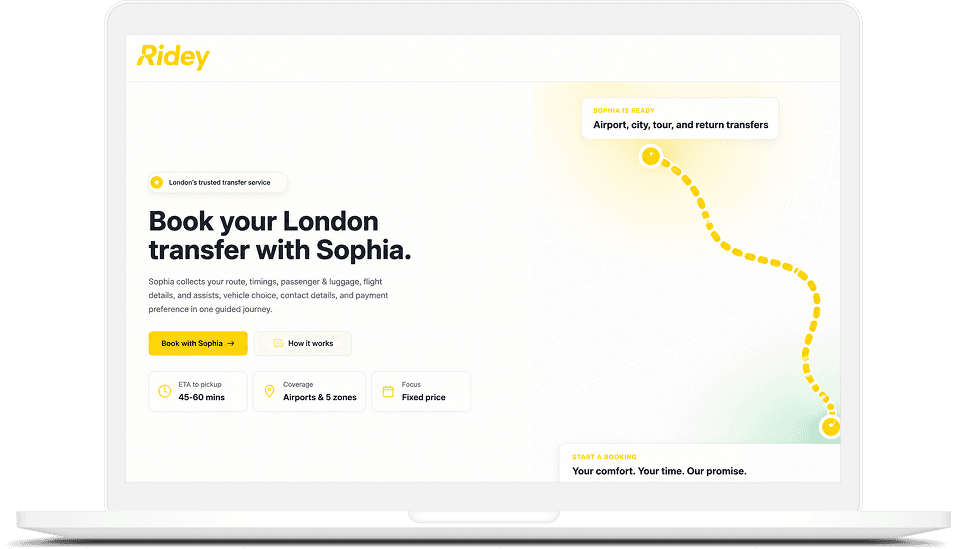
Ridey

Ridey supports transport teams that manage bookings, suppliers, pricing, and customer updates through one connected workflow.

  • Booking control: Keep ride requests, availability checks, customer details, and trip updates organized before dispatch begins.
  • Supplier matching: Help teams assign drivers, vehicles, or partners based on timing, location, service type, and trip needs.
  • Pricing support: Apply route, vehicle, supplier, or fixed-fare rules without relying on repeated manual checks.
  • Customer communication: Share booking confirmations, driver details, trip changes, and service updates through approved channels.
Feature Image

Enterprise Software Work Behind Our Chatbot Approach

These projects show how Hudasoft connects AI, business rules, dashboards, workflows, and system data in real software environments where chatbot logic can support users.

My London Transfer Booking Management System

Results Achieved

45%
Increase in Booking Conversion Rate
70%
Reduction in Booking Time
60%
Fewer Incomplete Bookings
100%
Automated Fare Calculations

My London Transfer Booking Management System

Industry
Transportation & Mobility
Location
Global

HudaSoft deployed an AI conversational booking chatbot that collects transfer details, maps them into structured booking data, calculates fares, triggers payments, and sends customer updates.

Client Feedback on AI Chatbot Delivery

Hear how clients describe Hudasoft's work on conversational systems, workflow automation, business data access, and operational support.

Enterprise AI Chatbot Architecture for Business Systems

Enterprise AI chatbot architecture defines how users, approved data, business systems, access rules, and escalation paths work together. Hudasoft plans this structure before development so the chatbot can support real customer and employee requests.

Card Icon

User Channels

Connect the chatbot with web apps, mobile apps, portals, WhatsApp, Slack, Microsoft Teams, or internal tools based on user access.

Card Icon

Chatbot Interface

Give users a simple conversation layer that collects request details, asks follow-up questions, and sends the right context forward.

Card Icon

AI Response Layer

Use the selected AI model to understand requests, prepare answers, apply response rules, and support the intended chatbot workflow.

Card Icon

RAG Knowledge Layer

Retrieve answers from approved documents, policies, FAQs, product data, support records, and internal knowledge sources.

Card Icon

Enterprise System Access

Connect CRM, ERP, helpdesk, HRM, booking, payment, reporting, or internal systems for approved lookups and workflow actions.

Card Icon

Controls and Escalation

Apply user permissions, restricted answers, logs, fallback rules, review points, and human handoff for sensitive or complex requests.

Business Operational Challenges

Enterprise System Integrations for AI Chatbots

Enterprise chatbots need access to the systems where customer, employee, order, ticket, and workflow data already live. Hudasoft connects each integration around approved actions, permissions, and the request the chatbot must support.

Connect the chatbot with lead records, customer profiles, pipeline stages, sales notes, and follow-up tasks so sales teams can manage requests with context.

Let the chatbot check tickets, create new cases, update statuses, route issues, and hand over conversations to support agents when needed.

Support order lookup, inventory checks, service status, finance records, approvals, and operational workflows through controlled system access.

Help employees access policy details, leave information, onboarding steps, benefits records, and internal request workflows based on role permissions.

Connect approved FAQs, SOPs, policies, product documents, training material, and internal records for retrieval-based chatbot answers.

Support scheduling, payment checks, account updates, service requests, booking changes, and customer self-service actions inside connected portals.

Security Controls for Enterprise AI Chatbots

Enterprise AI chatbot development needs clear rules for data access, user permissions, answer limits, and human review. These controls help the chatbot work with approved systems without exposing sensitive records or taking actions outside its role.

Card Icon

Role-Based Access Control

Define which users can view specific answers, records, workflows, and chatbot actions based on department, account type, role, or approval level.

Card Icon

Approved Data Access

Connect the chatbot with selected documents, policies, databases, support records, and business systems that match the client’s internal data rules.

Card Icon

Answer Limits and Human Review

Set rules for restricted answers, uncertain requests, sensitive topics, fallback responses, and handoff to the right team when review is needed.

Card Icon

AI Governance and Monitoring

Track conversations, model behavior, access events, system actions, and repeated answer issues so teams can review chatbot performance after deployment.

Plan a Controlled Enterprise Chatbot

Plan a Controlled Enterprise Chatbot

Share the workflow, systems, and user roles your chatbot needs to support. Hudasoft can help define the architecture, integrations, access rules, and production release plan.

How Hudasoft Builds Enterprise AI Chatbots for Production Use

Hudasoft defines the chatbot use case, data access, system integrations, response controls, and release plan so the enterprise chatbot can support real users with approved workflows.

AI Chatbots for Production Use Process
01.

01. Define the Chatbot Use Case

Identify the user group, request types, required answers, business actions, success criteria, and escalation points for the chatbot.

02.

02. Review Data and Permissions

Check approved documents, databases, policies, records, user roles, and access limits that the chatbot can use.

03.

03. Plan the Technical Architecture

Map the AI model, RAG setup, channels, integrations, response rules, logging needs, and human handoff paths.

04.

04. Build and Validate Responses

Develop the chatbot, connect approved sources, test answer quality, review edge cases, and confirm workflow behavior.

05.

05. Deploy and Monitor Usage

Release the chatbot with access controls, fallback rules, conversation logs, support ownership, and ongoing performance review.

01

Identify the user group, request types, required answers, business actions, success criteria, and escalation points for the chatbot.
02

Check approved documents, databases, policies, records, user roles, and access limits that the chatbot can use.
03

Map the AI model, RAG setup, channels, integrations, response rules, logging needs, and human handoff paths.
04

Develop the chatbot, connect approved sources, test answer quality, review edge cases, and confirm workflow behavior.
05

Release the chatbot with access controls, fallback rules, conversation logs, support ownership, and ongoing performance review.

Technology Stack for Enterprise AI Chatbot Development

Hudasoft selects each technology around the chatbot's response quality, retrieval needs, system connections, security requirements, and deployment environment so the build matches the enterprise workflow.

iOS

Swift
SwiftSwift
UI Kit
UI KitUI Kit
RxSwift
RxSwiftRxSwift
Combine
CombineCombine
MVVM
MVVMMVVM
Alomofire
AlomofireAlomofire
Core Data
Core DataCore Data

Android

Kotlin
KotlinKotlin
MVVM
MVVMMVVM
RxSwift
RxJavaRxJava
Java
JavaJava
Retrofit
RetrofitRetrofit
Jetpack
JetpackJetpack

Frontend

React js
React jsReact js
Next.Js
Next.JsNext.Js
Angular
AngularAngular
Vue
VueVue
Typescript
TypescriptTypescript
Html5
Html5Html5
CSS
CSSCSS
Javascript
JavascriptJavascript
GraphQL
GraphQLGraphQL
Apollo
ApolloApollo
MaterialUI
MaterialUIMaterialUI
Rest API
Rest APIRest API

Backend

Node.js
Node.jsNode.js
Python
PythonPython
Scala
ScalaScala
Php
PhpPhp
Java
JavaJava
Spring
SpringSpring
.Net
.Net.Net
Laravel
LaravelLaravel
Rest API
Rest APIRest API
Rest API
FAST APIFAST API
GO
GOGO
GO
Express JsExpress Js

CMS

Wordpress
WordpressWordpress
Magento
MagentoMagento
Shopify
ShopifyShopify
Contentful
ContentfulContentful

React

Redux
ReduxRedux
Mobx
MobxMobx
RxJS
RxJSRxJS
Redux Thunk
Redux ThunkRedux Thunk

Flutter

Bloc
BlocBloc
Dart
DartDart
MVVM
MVVMMVVM
Rx Dart
Rx DartRx Dart

Database

Mongodb
MongodbMongodb
MySQL
MySQLMySQL
MsSQL
MSSQL MSSQL
Dynamodb
DynamodbDynamodb
PostgreSQL
PostgreSQLPostgreSQL
IBM
IBMIBM
Redis
RedisRedis
Elasticsearch
ElasticsearchElasticsearch

DevOps

Nginx
NginxNginx
Docker
DockerDocker
Kubernetes
KubernetesKubernetes
Gradle
GradleGradle
Jenkins
JenkinsJenkins

Cloud

Aws
AWS AWS
Azure
AzureAzure
Rackspace
RackspaceRackspace
Linode
LinodeLinode
Firebase
FirebaseFirebase
Oracle Cloud
Oracle CloudOracle Cloud
Heroku
HerokuHeroku

Data Organization & Management

Databricks
DatabricksDatabricks
Snowflake
SnowflakeSnowflake
DataHub
DataHubDataHub
Pinecone
PineconePinecone
Weaviate
WeaviateWeaviate

Neural Network Programming & Model Training

PyTorch
PyTorchPyTorch
TensorFlow
TensorFlowTensorFlow
Keras
KerasKeras
JAX
JAXJAX

LLM Connectivity & 3rd Party APIs

LangChain
LangChainLangChain
LlamaIndex
LlamaIndexLlamaIndex
Google Gemini
Google GeminiGoogle Gemini
OpenAI
OpenAI APIOpenAI API
Deck
DeckDeck
SiliconFlow
SiliconFlowSiliconFlow

Multi-Agent Orchestration

LangGraph
LangGraphLangGraph
crewai
CrewAiCrewAi
autogen
Auto GenAuto Gen
semantickernel
Semantic KernelSemantic Kernel

ERP Development

Haystack
MorphXMorphX
tensorflow
X++X++
huggingFace
Microsoft/ALMicrosoft/AL

Enterprise AI Chatbot Solutions for Industry Workflows

Different industries use enterprise chatbots for different software workflows. Hudasoft connects chatbot planning with enterprise AI development services when industry workflows need approved data, system integrations, role-based access, and human review.

Partners Who Trust Our Expertise
Ford Logo
Ipaas Logo
Mazda Logo
GMC Logo
Nissan Logo
Dodge Logo
Toyota Logo
Qarya Logo
Mercedes Benz Logo
Ibizi Logo
DealerERP Logo
BMW Logo
UberSheet Logo
CreekSquare Logo
Supply Chain Logo
Honda Logo
Audi Logo

Enterprise Chatbot Delivery Backed by Product Engineering

Section visual

Enterprise AI chatbot development services need a team that understands how software behaves after launch. Hudasoft brings its AI development services experience into chatbot projects through product thinking, workflow clarity, release planning, and practical decisions that support long-term business use.

Chatbots Planned as Operational Software

Hudasoft plans each chatbot with defined users, workflow ownership, release scope, feedback loops, and support responsibility after launch.

Requirements Tied to Real Requests

The team documents actual request types, answer sources, system actions, approval needs, and handoff points before development starts.

Experience With Workflow Products

Hudasoft's work on booking, analytics, compliance, appointment, construction, and warranty platforms adds context to chatbot planning.

Production Readiness Before Release

The rollout plan covers internal testing, user access, failure paths, support ownership, and readiness checks before live use.

Technical Choices Based on Workflow Fit

Model choice, retrieval logic, integrations, and handoff rules are selected around the business workflow the chatbot supports.

Review Cycles After Launch

Hudasoft can review usage patterns, missed intents, repeated answer issues, handoff cases, and workflow gaps after release.

Excellence Through Visionary Leadership

Azfar Siddiqui
Azfar Siddiqui

Founder / CEO

LinkedIn
Saboor Ahmed
Saboor Ahmed

CTO (Chief Technology Officer)

LinkedInMediumDev

Frequently Asked Questions

FAQs

AI chatbots help large enterprises reduce repeated manual work, improve response speed, and give users faster access to approved information. They can support customer service, HR, IT, sales, operations, and internal knowledge workflows.
The main benefit comes when the chatbot connects with business systems, user roles, and escalation paths. This allows the chatbot to answer routine requests and send complex cases to the right team.

Choose a company that understands enterprise software, AI model behavior, RAG, integrations, security, and production support. The team should be able to explain how the chatbot will access data, take actions, and handle restricted requests.
Also review their experience with business systems, workflow automation, dashboards, customer portals, or operational software. Enterprise chatbot work needs more than a demo because the final system must support real users.

A professional enterprise AI chatbot development service helps plan the chatbot around approved data, system access, response quality, and business rules. This reduces the risk of weak answers, poor handoffs, and disconnected workflows.
The service also supports architecture planning, integration work, testing, access control, and production monitoring. These steps are important when the chatbot handles customer, employee, or internal business requests.

Start by identifying the internal process, user group, request types, and systems involved. Common internal chatbot workflows include HR questions, IT helpdesk support, policy lookup, sales reporting, operations requests, and document search.
Next, prepare approved data sources, define permissions, plan integrations, test answer quality, and set escalation rules. The chatbot should reach live users only after access controls, fallback paths, and review ownership are clear.

Helpful Resources

Let us accelerate your

Custom App Development

Whether you're building from scratch, scaling what works, or exploring what's possible, we're here to help turn your ideas into impact.