


AI agent frameworks help developers create software that can interpret goals, choose actions, use external tools, and complete multi-step tasks. The available options differ in workflow control, state management, model support, programming languages, and deployment requirements.
This guide compares the leading agent development options available in 2026. It covers LangGraph, CrewAI, OpenAI Agents SDK, Google ADK, Microsoft Agent Framework, LlamaIndex Workflows, Mastra, Agno, Pydantic AI, Strands Agents, and Claude Agent SDK.
Key Takeaways
- LangGraph suits long-running workflows that need explicit state, checkpoints, branching, and human approval.
- CrewAI supports role-based collaboration between agents with separate tasks and responsibilities.
- OpenAI Agents SDK provides a focused option for OpenAI-based agents, tools, handoffs, guardrails, sessions, and tracing.
- Google ADK supports several programming languages, multi-agent coordination, graph workflows, and Google Cloud deployment.
- Microsoft Agent Framework now provides Microsoft’s main development path for new projects that may previously have used AutoGen or Semantic Kernel.
- LlamaIndex Workflows fits document, retrieval, knowledge, and data-intensive agent applications.
- Mastra gives TypeScript teams agents, workflows, memory, storage, and observability in one development environment.
- Pydantic AI supports typed Python development, validated outputs, model choice, and structured dependencies.
- Strands Agents suits AWS and Amazon Bedrock projects that need tools, memory, telemetry, or AgentCore services.
- Claude Agent SDK supports Claude-based agents that need file operations, permissions, hooks, tools, and subagents.
AI Agent Framework Comparison
The following table compares the main development options by product type, language support, control model, and suitable use case.
| Product | Product type | Main languages | Control and state model | Suitable use cases |
| LangGraph | Orchestration framework and runtime | Python, TypeScript | Graphs, shared state, checkpoints, interrupts | Long-running and controlled workflows |
| CrewAI | Multi-agent framework and workflow system | Python | Agents, tasks, crews, processes, flows | Role-based agent collaboration |
| OpenAI Agents SDK | Agent SDK | Python, TypeScript | Agent loops, sessions, handoffs, guardrails | OpenAI-based assistants and automation |
| Google ADK | Agent development framework | Python, TypeScript, Go, Java, Kotlin | Agent hierarchies, graph and template workflows | Gemini and Google Cloud applications |
| Microsoft Agent Framework | Agent and workflow SDK | .NET, Python, Go preview | Agents, sessions, middleware, graph workflows | Microsoft and Azure environments |
| LlamaIndex Workflows | Event-driven workflow framework | Python, TypeScript | Events, workflow state, agent handoffs | Retrieval and knowledge applications |
| Mastra | TypeScript AI framework | TypeScript | Typed workflows, stored state, suspend and resume | Web products and internal applications |
| Agno | Agent SDK and platform | Python | Agents, teams, workflows, session state | API-based business agent platforms |
| Pydantic AI | Typed agent SDK | Python | Typed dependencies, structured outputs, durable execution integrations | Python APIs and structured agent tasks |
| Strands Agents | Agent SDK | Python, TypeScript | Model-driven loops, sessions, graphs, swarms | AWS and Amazon Bedrock applications |
| Claude Agent SDK | Agent SDK and execution harness | Python, TypeScript | Agent loop, permissions, hooks, sessions, subagents | Coding, research, and file operations |
We reviewed official documentation available as of 2026. The comparison considers product type, languages, workflow control, state, multi-agent coordination, integrations, observability, and intended use cases.
It does not represent a performance benchmark. Results also depend on the selected model, prompts, tools, data, infrastructure, and evaluation process.
Teams can validate a shortlist through a small application prototype. An experienced AI agent development services provider can assess each option against the planned workflow, integration requirements, security controls, and deployment environment.
What Are AI Agent Frameworks?
An AI agent framework is a software toolkit that provides reusable components for developing applications that can pursue a goal and take permitted actions. It connects a language model with application instructions, tools, business data, memory, and execution logic.
The language model provides reasoning and language capabilities. The framework controls how the application supplies context, exposes tools, stores state, coordinates steps, and records activity. A model alone does not manage the complete application.
Developers can build these components without a framework, though custom development requires more work around tool handling, state, retries, agent communication, and traces. A framework provides established patterns that teams can adapt to their application.
A framework also represents one layer within a broader agentic AI architecture. The complete system may include databases, model providers, business applications, identity controls, evaluation services, and deployment infrastructure.
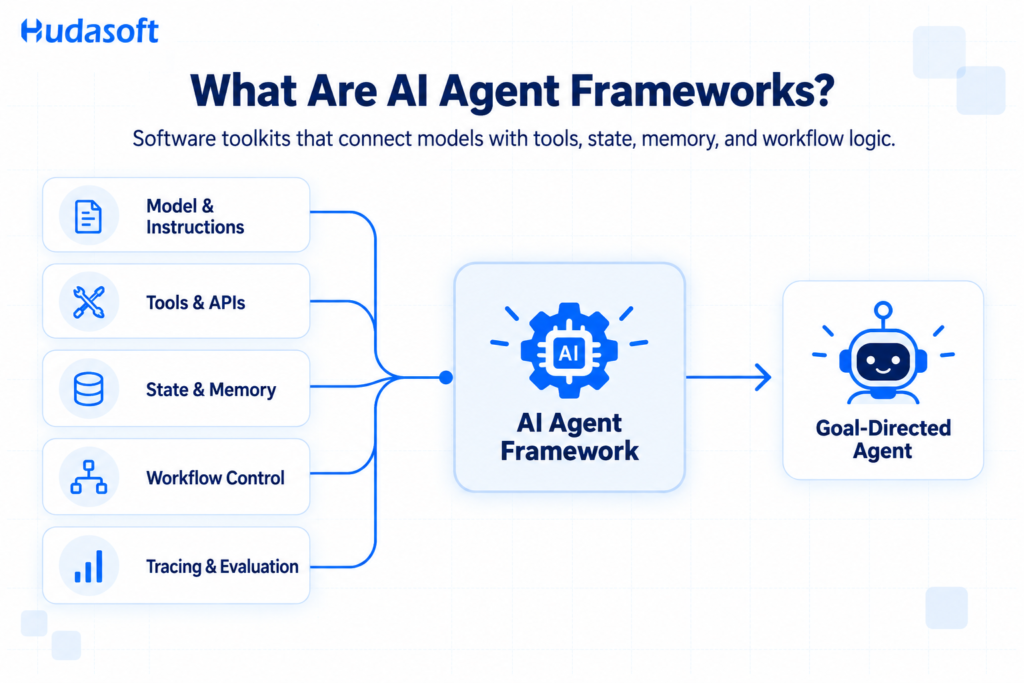
Core Capabilities of an AI Agent Framework
Frameworks differ in scope, though most options address several common development requirements. Businesses often use AI development services to select and configure these capabilities around their data, workflows, system integrations, security requirements, and deployment environment.
Agent Control and Workflow Orchestration
An agent loop controls the repeated process of receiving context, selecting an action, using a tool, reviewing the result, and choosing the next step.
Some frameworks give the language model more control over that sequence. Graph and workflow frameworks allow developers to define branches, loops, parallel steps, approval points, and completion conditions.
Explicit control helps when a process contains business rules or sensitive actions. A flexible agent loop may suit research and assistance tasks where the correct sequence depends on the request.
Tool and System Integration
Tools allow an agent to search data, call an API, create a file, query a business system, or complete an approved action. A framework converts each tool’s description, inputs, and output into a structure the model can use.
Developers still need to design each tool carefully. A reliable tool should have a narrow responsibility, validated inputs, clear permission boundaries, defined timeouts, and useful failure responses.
Model Context Protocol support can provide a standard connection method for compatible tools and data sources. Standardized connectivity does not replace access control or application-level validation.
State and Memory Management
State records what has happened during a task. It may contain messages, tool results, completed steps, user choices, workflow status, and approval decisions.
Memory stores information that the application may need across interactions. Session memory maintains current conversation context. Long-term memory may retain preferences, summaries, or selected knowledge.
Persistent state becomes important for long tasks and interrupted processes. Teams should verify where the framework stores state, how it handles concurrent updates, and whether execution can continue safely after a failure.
Multi-Agent Coordination
A multi-agent application assigns different responsibilities to separate agents. One agent may gather data, another may review it, and another may prepare the final output.
Frameworks coordinate agents through supervisors, handoffs, crews, teams, subagents, or graph transitions. Each method controls which agent receives context and which agent owns the next decision.
More agents create additional model calls, transfers, and failure paths. Teams should introduce another agent only when it requires a separate role, toolset, context boundary, permission level, or evaluation criterion.
Observability and Evaluation
Observability records how an agent completed a task. Useful traces include model requests, model responses, tool arguments, tool results, state transitions, errors, retries, latency, token use, and human approvals.
Evaluation measures whether the system produced an acceptable result. Tests may check final output, tool selection, execution path, structured data, citation support, policy compliance, and recovery behavior.
Built-in tracing can reduce debugging work. The engineering team still needs evaluation cases that represent normal requests, edge cases, tool failures, and restricted actions.
How AI Agent Frameworks Support Business Applications
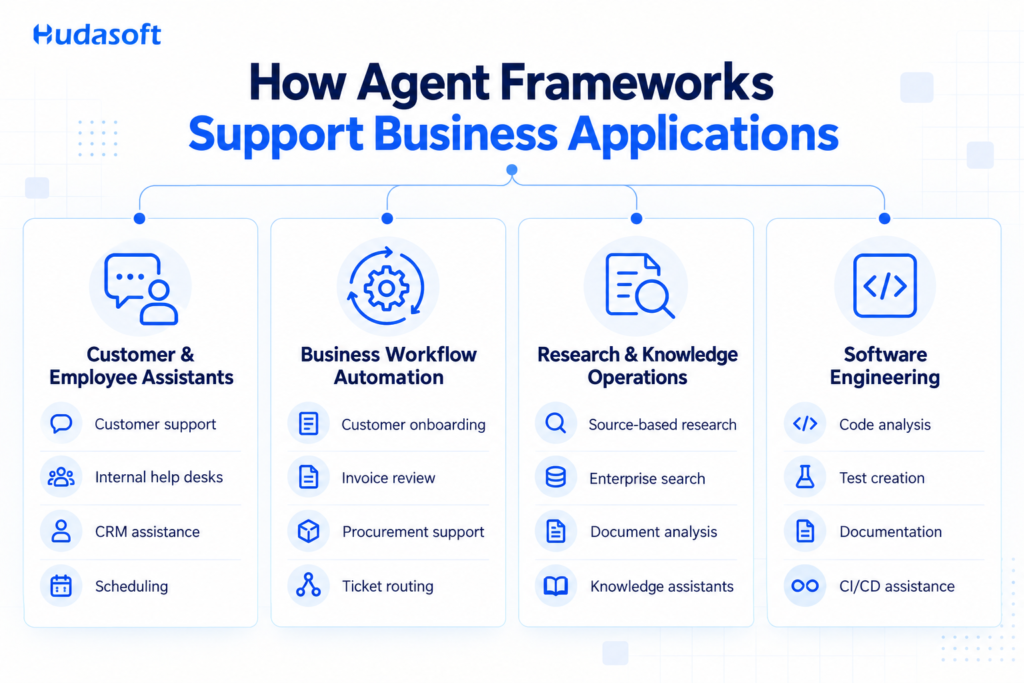
Organizations use agent frameworks when an application must interpret unstructured requests and coordinate several actions. Successful deployment also requires an AI implementation plan that defines data access, system authority, evaluation, monitoring, and human oversight.
Business Workflow Automation
Agents can coordinate tasks across CRMs, ERPs, document systems, databases, and internal APIs. Common applications include customer onboarding, invoice review, procurement support, service ticket routing, and operations reporting.
The workflow should use deterministic code for fixed business rules. The agent can interpret documents, classify requests, select approved tools, and handle cases that contain unstructured information.
Research and Knowledge Operations
Research agents can develop search plans, collect information, compare evidence, and prepare cited reports. Knowledge agents can retrieve information from company documents, databases, or approved external sources.
These applications need source controls and retrieval evaluation. A fluent answer does not prove that the agent used the correct evidence.
Software Engineering
Engineering agents can inspect code, search technical documentation, propose changes, create tests, and review results. The application may connect with repositories, issue trackers, development environments, and continuous integration tools.
A separate guide to AI agent workflow automation for software development explains how agents interact with repositories, tests, review policies, and delivery systems.
Customer and Employee Assistants
An assistant can understand requests, retrieve account or policy information, and use approved tools. Common applications include customer support, employee help desks, scheduling, CRM assistance, and sales operations.
The application should separate read-only access from actions that change business data. Account updates, refunds, bookings, and external messages may require confirmation or human approval.
How to Choose an AI Agent Framework
The selection process should start with the planned workflow. Feature counts and repository popularity provide limited evidence when the framework does not match the application’s control, state, or deployment requirements.
Define the Required Level of Control
Map the actions, decision points, system connections, and stopping conditions. A simple assistant may need a model, several tools, and session history. A long-running business process may require explicit branches, checkpoints, approvals, and recovery rules.
Teams should also decide whether users need autonomous execution or interactive assistance. The comparison between AI agents and copilots can help define how much control the software should receive.
Assess State and Recovery Requirements
Determine what the application must remember during and between tasks. Check whether a process needs conversation state, workflow state, checkpoints, long-term memory, or all four.
The team should also define failure behavior. A model request may time out, an API may return an error, or a worker may stop during execution. The framework should expose enough state to continue or close the task safely.
Tools that change records need idempotency controls. This prevents a retry from creating duplicate payments, messages, tickets, or database updates.
Review Tool Access and Security
List every system the agent needs to access. Define the data it can read, the actions it can take, and the cases that require approval.
A large tool collection can reduce selection accuracy and increase risk. Give each agent only the tools required for its assigned responsibility.
Review authentication, secrets, network access, logging, data retention, and permission management. A framework can support these controls, though the application architecture must enforce them.
Compare Model and Provider Support
Provider-specific SDKs often support native model features quickly. Provider-neutral frameworks can give teams a wider model selection.
Model portability still requires testing. Models differ in tool calling, structured output, context handling, latency, and instruction following. Changing a model name does not guarantee equivalent behavior.
Selected steps may not require the largest available model. Teams can evaluate small language models for agent tasks such as classification, routing, extraction, and verification when those tasks have clear boundaries.
Match the Programming Language
A framework should fit the team that will maintain the application.
Python teams can consider LangGraph, CrewAI, Microsoft Agent Framework, LlamaIndex, Agno, Pydantic AI, Strands Agents, Google ADK, or Claude Agent SDK.
TypeScript teams can consider LangGraph, OpenAI Agents SDK, Google ADK, LlamaIndex.TS, Mastra, Strands Agents, or Claude Agent SDK. Microsoft Agent Framework provides a direct option for .NET applications.
Language support does not guarantee equal features. Teams should review the documentation for the exact SDK version they plan to use.
Compare Observability and Evaluation
Confirm that the framework records model calls, tool activity, state transitions, errors, retries, handoffs, latency, and token usage. Developers should be able to reconstruct how the application reached its result.
Create a small evaluation set that covers standard tasks, ambiguous requests, missing data, tool failures, restricted actions, and approval cases. Compare frameworks using the same model, prompts, tools, and inputs.
Repeated tests provide stronger evidence than one successful demonstration. Teams should measure task completion, tool accuracy, output validity, failure recovery, latency, and engineering effort.
Estimate Development and Operating Requirements
Framework choice affects AI agent development cost because orchestration depth, memory, integrations, evaluation, security controls, and deployment requirements change the engineering scope.
A compact internal assistant may need a small SDK and several tools. A persistent multi-agent workflow may require storage, queues, identity controls, evaluation infrastructure, monitoring, and recovery logic.
Teams should compare the complete application requirements instead of comparing framework license costs alone.
Leading Frameworks in 2026
The following reviews focus on the capabilities that distinguish each product. The right selection depends on the application rather than a universal framework ranking.
1. LangGraph
LangGraph is an agent orchestration framework and runtime maintained by the LangChain team. Developers represent a workflow through nodes, transitions, and shared state.
A node can contain a model call, tool call, function, human decision, or another graph. Conditional transitions allow the application to select the next node based on current state.
LangGraph’s persistence system saves checkpoints during execution. These checkpoints support human review, fault recovery, session memory, and inspection of earlier workflow states. The framework supports Python and TypeScript.
Recommended use: LangGraph suits long-running workflows, document processes, support operations, research pipelines, and applications that need controlled branching or human approval.
Main tradeoff: Teams must design state schemas and transitions. A small assistant may not need this level of orchestration.
2. CrewAI
CrewAI organizes applications around agents, tasks, crews, processes, and flows. An agent receives a role, instructions, tools, and context. A crew coordinates tasks between several agents.
Sequential processes execute tasks in a defined order. Hierarchical processes allow a manager agent to assign and review work. CrewAI Flows can maintain application state, route events, persist progress, and resume longer processes.
The framework also supports memory, knowledge sources, guardrails, human input, and external tools.
Recommended use: CrewAI suits research, content operations, support triage, sales preparation, and workflows that have clear specialist roles.
Main tradeoff: Weak role definitions can create repeated work and unnecessary agent conversations. Each role should own a distinct responsibility.
3. OpenAI Agents SDK
OpenAI Agents SDK provides a focused set of primitives for agents, tools, handoffs, guardrails, sessions, and tracing. OpenAI maintains official Python and TypeScript SDKs.
Handoffs allow one agent to transfer control to another agent with different instructions or tools. Developers can also expose a specialist agent as a tool when a central agent should keep control.
Guardrails can validate inputs or outputs at selected points. Sessions preserve conversation history through supported storage or an application-managed implementation. Tracing records model calls, tools, handoffs, and guardrail activity.
Recommended use: The SDK suits OpenAI-based assistants, customer support, request routing, voice applications, and focused tool automation.
Main tradeoff: Complex workflow state and recovery may require application code or another orchestration system.
4. Google Agent Development Kit
Google Agent Development Kit is Google’s open-source agent development framework. Google provides SDKs for Python, TypeScript, Go, Java, and Kotlin.
ADK supports LLM agents, agent hierarchies, tools, sessions, state, memory, artifacts, callbacks, MCP, observability, and evaluation. It also provides sequential, parallel, loop, collaborative, and graph-based workflow patterns.
Gemini receives direct support, and the framework can connect with other model providers. Teams can deploy agents through their own infrastructure or supported Google Cloud services.
Recommended use: Google ADK suits Gemini applications, Google Cloud projects, multimodal agents, and workflows that need several agents or explicit graph control.
Main tradeoff: Capabilities may differ between language implementations. Teams should verify the required features for their chosen SDK.
5. Microsoft Agent Framework
Microsoft Agent Framework is Microsoft’s current SDK for building individual agents and explicit workflows. Microsoft identifies it as the direct successor to AutoGen and Semantic Kernel.
The framework combines agent abstractions with sessions, middleware, type safety, telemetry, model integrations, and graph-based workflows. Developers can use an agent for an open-ended task or a workflow for a process with defined execution paths.
Microsoft provides primary support for .NET and Python. Go remains in preview and may not offer every capability. The framework connects with Microsoft Foundry, Azure OpenAI, OpenAI, Anthropic, and other supported services.
Recommended use: It suits Microsoft environments, Azure applications, .NET systems, governed workflows, and projects migrating from AutoGen or Semantic Kernel.
Main tradeoff: Migration requires planning, and language implementations may develop at different rates.
6. LlamaIndex Workflows
LlamaIndex Workflows provides event-driven orchestration within the wider LlamaIndex data framework. It works closely with LlamaIndex components for documents, indexes, retrieval, vector stores, and knowledge sources.
AgentWorkflow provides a prepared structure for tool-calling agents, state, and agent handoffs. Developers can create custom workflows when the application needs different events, steps, routing rules, or data handling.
LlamaIndex provides Python and TypeScript development options.
Recommended use: LlamaIndex Workflows suits document assistants, enterprise search, RAG systems, knowledge operations, and data-intensive agent applications.
Main tradeoff: Retrieval quality depends on source data, metadata, indexing, permissions, and evaluation. A basic tool assistant may not need its broader data ecosystem.
7. Mastra
Mastra is a TypeScript framework for building agents and workflow-based applications. It provides components for models, tools, workflows, memory, storage, evaluation, and observability.
Mastra separates flexible agent decisions from workflows that follow predetermined steps. Its workflows support typed inputs and outputs, branches, loops, parallel execution, suspension, and resumption.
Storage adapters can preserve workflow state, memory, traces, evaluation results, and schedules. Mastra Studio helps developers inspect agents, workflows, and execution data during development.
Recommended use: Mastra suits TypeScript web products, SaaS applications, internal tools, customer portals, and content operations.
Main tradeoff: Its TypeScript focus provides limited value to Python-first teams. Deployment still requires appropriate storage and infrastructure.
8. Agno
Agno provides a Python SDK for building agents, teams, and workflows. Its wider platform includes AgentOS for serving agents through APIs and MCP, plus a control plane for management.
Agents can use models, tools, knowledge sources, memory, guardrails, and structured outputs. Teams coordinate multiple agents. Workflows combine agents, teams, and functions through sequential, parallel, conditional, and loop-based steps.
Agno can persist session state when the application connects a supported database. Its toolkit collection covers cloud services, data platforms, business systems, files, and development tools.
Recommended use: Agno suits Python-based business assistants, internal platforms, API-delivered agents, and workflows that combine application functions with agent decisions.
Main tradeoff: Teams should determine whether they need the SDK, AgentOS, the control plane, or a combination of these components.
9. Pydantic AI
Pydantic AI applies Pydantic’s typed development model to Python agents. It supports typed dependencies, validated tool arguments, and structured outputs.
Developers can require an agent to return a defined Pydantic model. This reduces the amount of unstructured text that application code must interpret. Typed dependencies also give tools controlled access to database connections, user context, or other application services.
Pydantic AI supports multiple model providers, toolsets, MCP, multi-agent patterns, OpenTelemetry instrumentation, and Pydantic Evals. Durable execution integrations include Temporal, DBOS, Prefect, and Restate.
Recommended use: Pydantic AI suits Python APIs, structured extraction, classification, support automation, and data applications.
Main tradeoff: TypeScript or .NET teams will need another option. Durable background execution may also require an external workflow system.
10. Strands Agents
Strands Agents is an open-source agent SDK created by AWS. Its central agent pattern combines a model, system instructions, and tools.
The SDK supports Python and TypeScript. It works closely with Amazon Bedrock and can use other supported model providers. Strands also provides MCP connections and multi-agent patterns such as graphs, workflows, and swarms.
Amazon Bedrock AgentCore can add managed memory, identity, evaluation, observability, browser access, code execution, and hosted execution. Teams can also deploy the SDK through their own infrastructure.
Recommended use: Strands Agents suits AWS applications, Amazon Bedrock projects, tool-using assistants, and agent systems that need AgentCore services.
Main tradeoff: AWS provides the most direct operating path. Teams should distinguish the open-source SDK from optional managed services when comparing requirements.
11. Claude Agent SDK
Claude Agent SDK gives Python and TypeScript developers an execution environment for Claude-based agents. It provides tools, sessions, hooks, permissions, file operations, MCP connections, and subagents.
The Agent SDK differs from Anthropic’s standard API client. The standard client sends model requests. The Agent SDK manages a continuing process in which Claude can inspect context, select tools, review results, and proceed with the task.
Permission rules control which actions the agent can take. Hooks allow application code to inspect or respond to events during execution.
Recommended use: Claude Agent SDK suits coding agents, repository assistants, research tools, file processing, and Claude-based applications that need controlled tool access.
Main tradeoff: The SDK centers on Claude. File operations and command execution require strict permissions and isolated environments.
Choosing the Right Option
No framework leads across every requirement. The best AI agent framework is the option that matches the application’s workflow, state, language, provider, integration, and operating constraints.
LangGraph provides detailed workflow control. CrewAI supports role-based teams. OpenAI Agents SDK offers a compact OpenAI development model. Google ADK fits Gemini and Google Cloud projects. Microsoft Agent Framework suits Microsoft and Azure environments.
LlamaIndex Workflows supports data and retrieval applications. Mastra serves TypeScript products. Agno combines Python agents with platform components. Pydantic AI supports typed Python services. Strands Agents fits AWS deployments. Claude Agent SDK provides a controlled Claude execution environment.
Teams should shortlist two or three options and implement the same representative workflow with each one. The comparison should measure task completion, tool accuracy, recovery behavior, latency, execution traces, and maintenance effort.
Organizations that need technical support with framework selection, architecture, integrations, or deployment can work with Hudasoft to assess the available options against their application requirements.
Frequently Asked Questions
Which framework is suitable for a multi-agent system?
CrewAI suits role-based teams with separate responsibilities. LangGraph suits multi-agent workflows that need explicit routing and shared state. Google ADK and Microsoft Agent Framework also support structured coordination. The right option depends on how agents divide work and exchange control.
What is the difference between LangChain and LangGraph?
LangChain provides components for models, tools, retrieval, and agents. LangGraph provides an orchestration layer for stateful workflows. Developers can use LangChain components inside a LangGraph application, though LangGraph can also coordinate regular functions and external services.
Can one application use more than one framework?
Yes. An application could use LangGraph for orchestration and LlamaIndex for document retrieval. Another application could combine a provider SDK with an external workflow engine. Each additional dependency increases integration and maintenance work, so the combination should address a defined requirement.
Can agent frameworks use different language models?
Many options support models from several providers. LangGraph, CrewAI, LlamaIndex, Agno, Pydantic AI, Google ADK, and Strands Agents provide broad model integrations. Provider SDKs focus more closely on their own ecosystems. Teams should retest tool use, structured output, and instructions when changing models.
Can open-source frameworks operate on private infrastructure?
Many open-source options can operate in a private cloud or company-managed environment. Privacy still depends on the selected model, tool connections, telemetry, storage, and network configuration. Hosting the framework internally does not prevent data from reaching an external model API.

